
A check and a remittance stub arrive in the same envelope. Another envelope contains a customer application and a handwritten note. A third holds a letter that doesn’t match any familiar form.
All three envelopes are opened, and their contents are scanned.
Now what?
The organization has digital images, but someone—or something—still needs to determine what each document is, which pages belong together, and where the information should go.
This is where intelligent document classification becomes valuable.
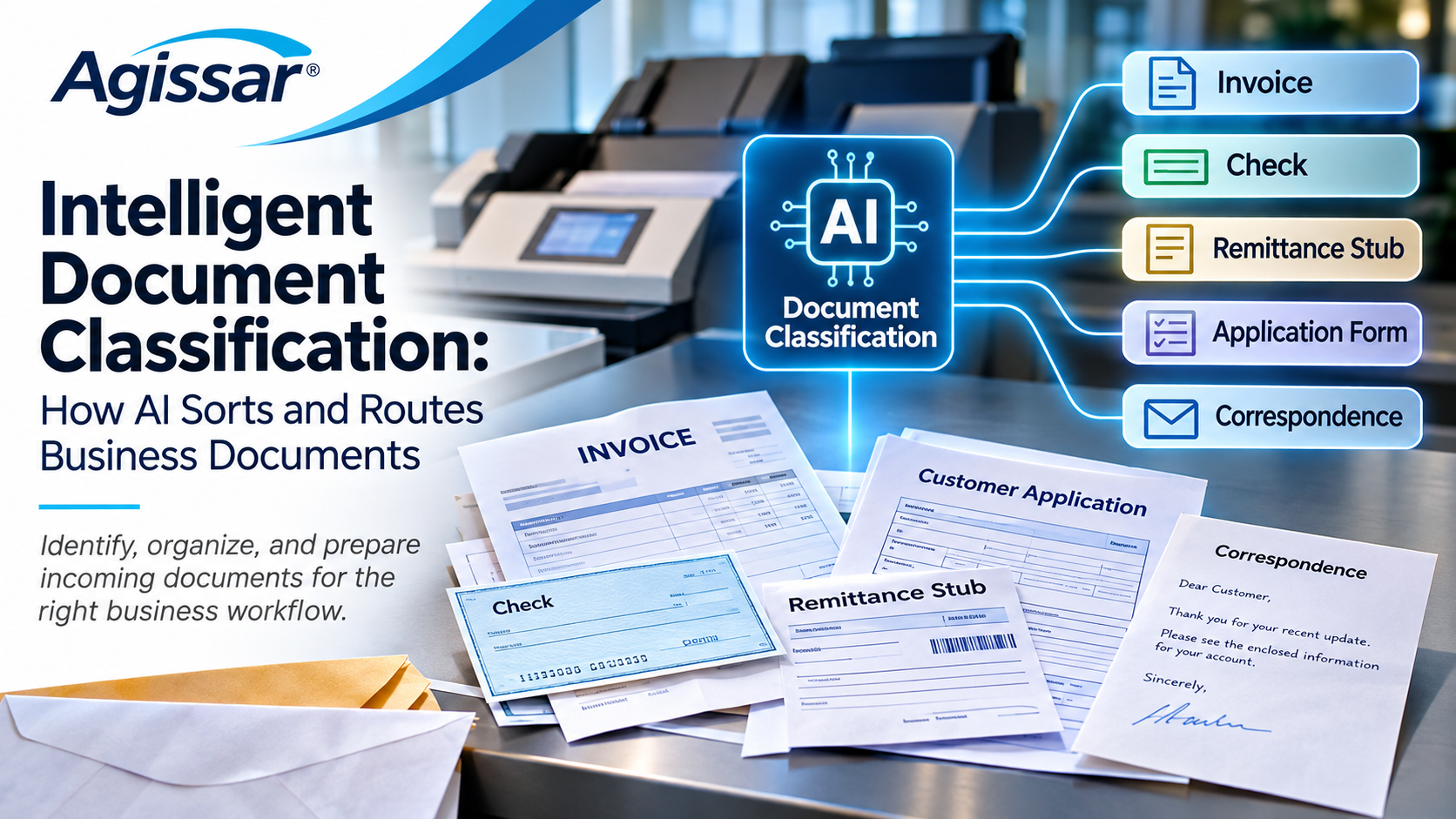
Using artificial intelligence and document analysis, classification technology can help identify incoming business documents without requiring someone to sort every item by hand.
That sounds simple enough. But identifying documents is only one part of the job.
For organizations handling physical mail, checks, remittances, customer forms, and mixed batches of paperwork, the bigger challenge is keeping information organized from the moment it arrives until it reaches the right business process.
Let’s look at how document classification works, what it can accomplish, where it can go wrong, and why the surrounding workflow matters just as much as the AI.
What Is Intelligent Document Classification?
Intelligent document classification uses machine learning and other document-analysis techniques to identify and categorize documents.
A system might recognize that an incoming page is an invoice, application, check, remittance stub, or piece of business correspondence.
Instead of depending entirely on a person to make that decision, the software analyzes available clues and predicts which category best fits the document.
Those clues can include:
- Words and phrases appearing on the page
- Document layout and structure
- Recognizable fields or identifying features
- Barcodes or other document identifiers
- Patterns learned from representative examples
The exact approach depends on the technology.
Some systems rely heavily on text recognition. Others analyze document images and layouts as well. Many combine several methods.
Once a document has been identified, its category can help determine which processing steps should follow.
An invoice may need financial review. A customer application may require information extraction. A payment-related item may need to enter a controlled transaction workflow.
Classification identifies the document. Business rules and connected systems determine what happens next.
That distinction is important. An AI model identifying an invoice doesn’t mean the invoice has been checked, approved, or entered into an accounting system.
Common Types of Documents AI Can Classify
Depending on the categories a system supports, document classification can be applied to:
- Invoices and purchase orders
- Applications and registration forms
- Checks and remittance documents
- Customer correspondence
- Service requests
- Claims and supporting documents
- Contracts and agreements
- Forms containing handwritten information
Not every system supports every category. Organizations must confirm that the documents they actually receive are represented in the model’s supported classes or configuration.

Why Automated Document Sorting Matters
It’s easy to underestimate how much work happens before a document reaches the department that needs it.
Think about an incoming mail operation.
Envelopes are opened. Contents are removed. Pages are prepared for scanning. Some documents arrive folded, stapled, or mixed with other paperwork.
Then someone may need to decide what each item is.
Does this letter belong with a customer application? Is this page a remittance stub or an invoice? Does an unfamiliar form require special handling?
Those decisions can create delays, particularly when the volume of incoming information changes throughout the day.
Manual Sorting Can Become a Bottleneck
Manual document sorting involves repeated decisions.
An employee may need to inspect a document, identify its type, select a category, and move it into the appropriate queue.
That process may be necessary for unusual items, but requiring the same attention for routine documents can limit how much work moves through the operation.
Automated document sorting can reduce that repetitive effort when the software recognizes the documents reliably.
Similar Documents Can Be Confusing
Not all invoices look alike.
Customer forms change. Different departments use different templates. An organization may receive information from hundreds of outside sources, each with its own formatting.
A system built around one fixed form layout may struggle when the documents vary.
Machine-learning classification can help accommodate that variation, provided the model has been appropriately trained or configured and tested.
A Sorting Error Can Travel Downstream
What happens when a document enters the wrong queue?
Someone may have to find it, reclassify it, and send it to the correct destination.
If the error isn’t discovered quickly, it may delay a customer response or interrupt another business process.
For documents associated with payments, applications, or regulated records, the consequences may be more significant.
This is why classification quality matters beyond the initial sorting decision.
The question isn’t simply, “Did the AI recognize the page?”
It’s also, “What happened because of that decision?”
OCR vs. Document Classification vs. Data Extraction: What’s the Difference?
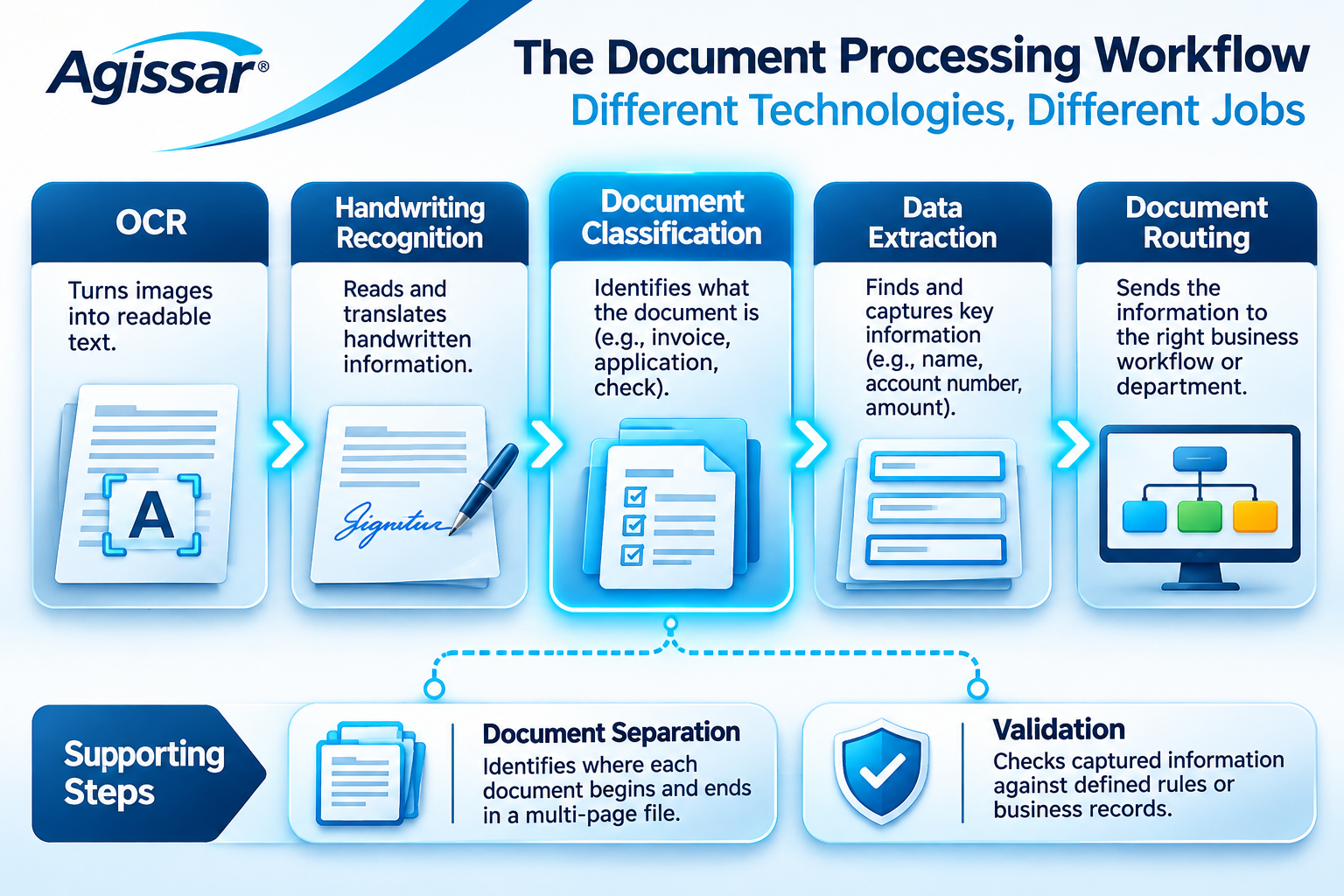
These technologies are frequently discussed together. They are related, but they do different jobs.
| Technology | Main purpose | Example |
|---|---|---|
| Optical Character Recognition (OCR) | Converts text in an image into machine-readable text | Reads printed information from a scanned letter |
| Handwriting recognition | Recognizes handwritten text | Reads a handwritten customer name |
| Document classification | Identifies the document type | Determines that a page is an application |
| Document separation | Identifies the boundaries between individual documents | Finds separate documents within a multi-page scan |
| Data extraction | Locates required information | Finds the invoice number and amount |
| Data validation | Checks information using defined rules or available records | Flags a missing account number |
| Document routing | Directs information into a designated workflow | Sends an application to a review queue |
Consider a scanned invoice.
OCR may recognize the printed words and numbers.
Classification may identify the document as an invoice.
Extraction may locate the supplier name, invoice number, and amount due.
Validation may check whether the required information is present and meets the organization’s rules.
A connected workflow may then send the document to the appropriate team or business application.
No single step should be mistaken for the entire process.
There’s also some overlap between technologies. Certain products combine classification and document splitting, while others provide those capabilities separately. Some classification models use OCR-generated text; others can analyze page images and layout.
The correct workflow depends on the available technology and the organization’s requirements.
For a closer look at the recognition stage, read our previous article, AI Handwriting Recognition: From Handwritten Documents to Usable Business Data.
The Mixed-Document Problem: Keeping Related Information Together
Here’s where intelligent classification becomes especially interesting for organizations that process physical mail.
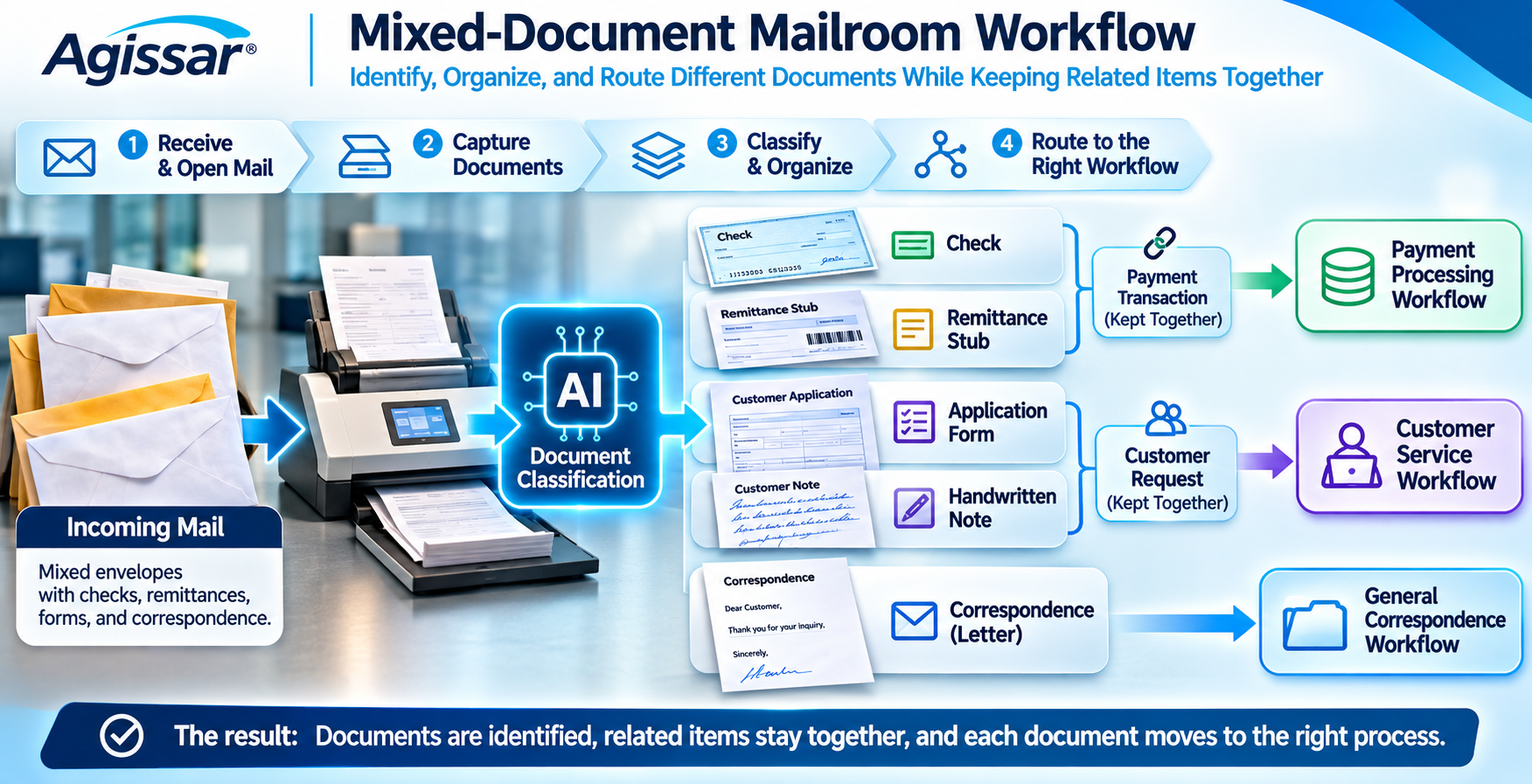
Imagine a customer sends a payment in an envelope.
Inside are a check, a remittance stub, and a short handwritten note explaining an account change.
Each item serves a different purpose.
A classification system might correctly identify all three documents.
That’s helpful.
But if the documents are separated without preserving their relationship, the organization still has a problem.
Which remittance stub belongs with which check? Does the handwritten note affect how that payment should be handled? Can someone later establish that all three items arrived together?
Correct classification doesn’t automatically preserve document relationships.
This is one of the most important distinctions in mixed-document processing.
Three Different Questions Need Answers
- What is this document? Classification identifies the document type.
- Where does this document begin and end? Separation determines the pages belonging to each individual document.
- Which documents belong together? Grouping or transaction-association logic maintains the relationships needed by the business process.
Those questions are related, but they aren’t interchangeable.
A multi-page customer application may need to remain intact. A check and remittance stub may need to stay associated with one another. Supporting correspondence may need to remain connected to the same case or transaction.
Depending on the environment, those relationships may be preserved using batch identifiers, transaction rules, document order, metadata, or other controls.
AI classification may help identify the individual items, but additional workflow logic or review may be required to establish their relationships accurately.
What a Mixed Batch Might Contain
| Incoming document | Possible classification | Additional processing consideration |
|---|---|---|
| Check | Payment document | Maintain appropriate transaction association and controls |
| Remittance stub | Payment support document | Associate with the corresponding payment |
| Handwritten note | Correspondence | Recognize relevant text and determine whether review is needed |
| Customer application | Application form | Keep all necessary pages together |
| General letter | Correspondence | Route using applicable content and business rules |
These are examples of possible workflows, not claims that every classification system performs these actions automatically.
They illustrate a practical lesson: a document can be identified correctly and still be processed incorrectly if the surrounding workflow loses important context.
How AI Document Classification Works
There’s no single technical design used by every provider, but several approaches are common.
Text-Based Classification
Some systems analyze the words recognized within a document.
Terms such as “invoice,” “application,” and “payment advice” may provide clues about the document’s purpose.
Other information, such as field labels or the context surrounding particular values, may help distinguish similar document types.
Text recognition can be useful, but it isn’t always enough.
An invoice and a purchase order might contain similar names, addresses, quantities, and amounts.
Layout and Visual Analysis
Many documents have recognizable structures.
An invoice may contain line items and totals. An application may contain labeled fields and signature areas. A letter may consist mainly of paragraphs.
Models that analyze layout or visual features may use those patterns alongside text to identify a document.
However, layout-based recognition can still struggle with unusual templates, poor images, and documents that resemble one another.
Rules and Identifiers
Not every sorting decision requires a complex AI model.
A known barcode, document identifier, or predefined business rule may identify some materials reliably.
A practical system may use traditional rules alongside machine learning.
The objective isn’t to use AI for every decision. It’s to use the appropriate method for the document and the job.
Models Configured for Business Documents
Some classification technologies can be configured or trained using representative documents.
This may be useful when a business processes specialized forms that aren’t covered by general-purpose categories.
Good examples matter.
A model trained on only a narrow range of clean documents may struggle when it encounters unusual layouts, handwritten additions, or poor-quality scans.
Testing should include documents the system wasn’t trained on, with enough variety to represent actual incoming work.
From Incoming Mail to the Right Business Workflow
When classification becomes part of a broader document-processing operation, the process may look something like this.
Step 1: Capture the Document
Physical documents are scanned or imaged. Electronic files enter through supported digital channels.
At this stage, image quality, completeness, and useful identifying information matter.
Step 2: Prepare and Identify Document Boundaries
Pages may need rotation, image correction, or separation into individual documents.
If several documents are contained in one file, the system may need to establish which pages belong to each document.
This can involve dedicated splitting technology, configured rules, or human review.
Step 3: Classify the Document
The classifier predicts the document type using available text, visual features, identifiers, or other supported methods.
Depending on the system, classification and separation may be closely integrated.
Step 4: Apply the Appropriate Processing Rules
Once a document has been identified, the workflow can select the next action.
A customer form may require field extraction. General correspondence may require review. A payment-related document may need specialized controls.
The classification result informs these decisions; it doesn’t replace the business rules.
Step 5: Extract and Check the Information
Where required, data extraction locates information within the document.
Validation checks whether that information meets defined requirements.
A missing field, inconsistent value, or failed lookup may require further attention.
Step 6: Handle Exceptions and Route the Work
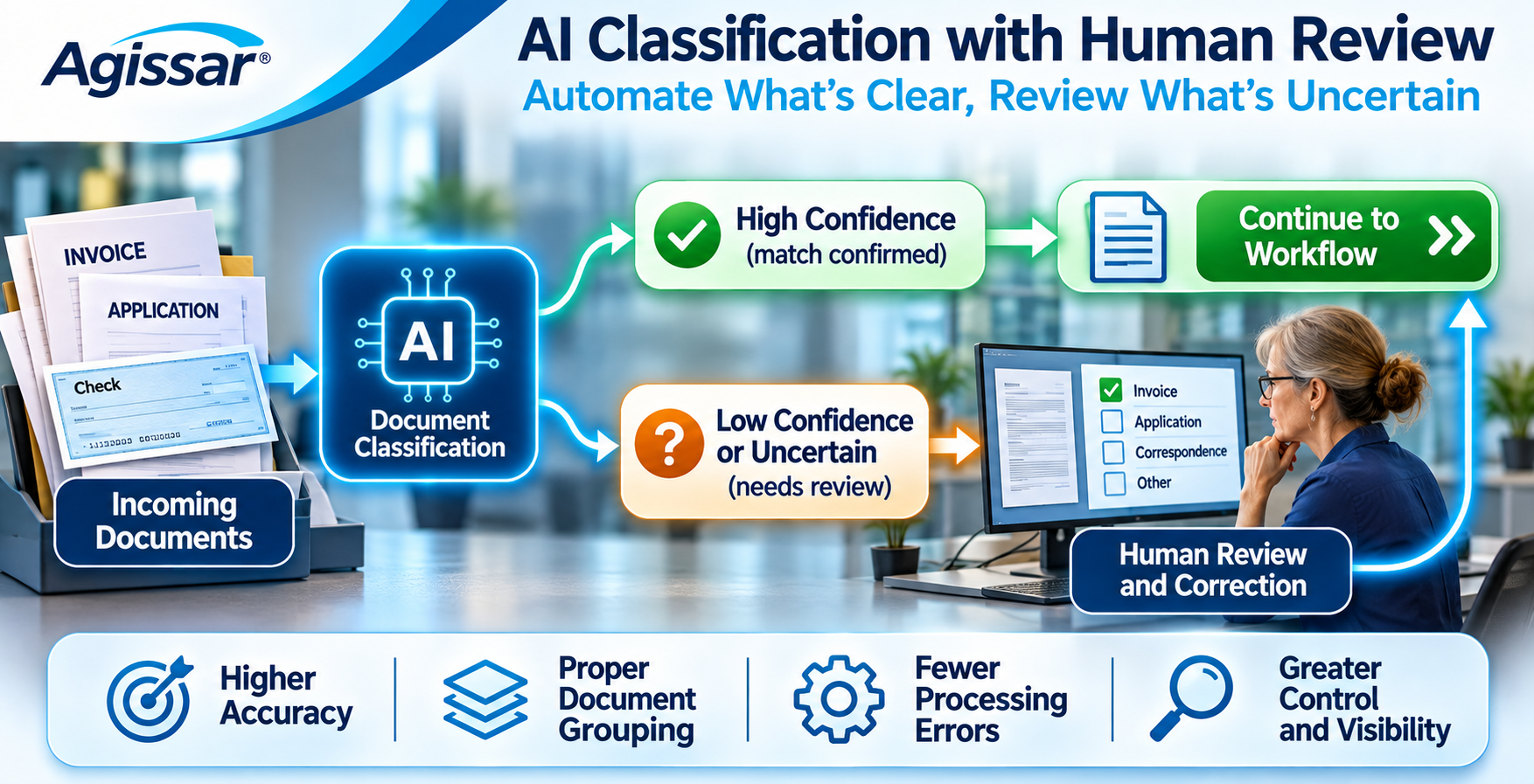
Uncertain classifications, unusual documents, and failed checks may be directed to an authorized reviewer.
Once the appropriate conditions have been met, the document or its information can move into the designated business process.
Tracking can help the organization understand what arrived, how it was handled, and where attention is still needed.
This is the larger idea behind AI Vision Intelligent Capture: connecting document recognition and understanding with the processes that use the information.
To understand how incoming forms, checks, remittance documents, and correspondence can be identified and organized, read our guide to Intelligent Document Classification: How AI Sorts and Routes Business Documents.
What Happens When AI Classifies a Document Incorrectly?
Even a well-configured classification system can make mistakes.
Two forms may look nearly identical. An unfamiliar document may resemble a known category. A poor scan may hide information that would otherwise make the answer obvious.
The system needs a way to handle those situations.
Confidence Scores Need Context
Some classification systems return a confidence score with each prediction.
That score can help determine whether automatic processing or review is appropriate.
But a high confidence score isn’t a guarantee of correctness. Organizations need to evaluate how scores relate to actual errors in their own documents.
The appropriate review threshold depends on the business process and the consequences of mistakes.
Not Every Document Fits a Known Category
A common problem arises when the model encounters a document it wasn’t designed to recognize.
Rather than automatically assigning that document to an unsuitable category, a workflow may use an “unknown” or “other” category, a confidence threshold, or an exception rule.
These behaviors depend on the system’s configuration.
The key is to decide what should happen before an unfamiliar document enters production.
Human Corrections Should Be Traceable
An employee may need to correct a category, confirm a document grouping, or redirect an item.
Those actions can provide valuable information about where a process needs improvement.
Some products support using corrected examples in later model training. That doesn’t mean every correction automatically changes the AI model.
Corrections, model updates, and production changes should follow an appropriate review process.
How to Measure Intelligent Document Classification Performance
A successful demonstration doesn’t necessarily predict what will happen when an organization processes its everyday documents.
Real performance depends on the types of documents, their quality, the categories supported, and the workflow surrounding the classifier.
These are the measurements worth examining:
| Measurement | What it helps reveal |
|---|---|
| Classification accuracy | How often the predicted document type is correct |
| Precision by category | How often documents assigned to a particular category truly belong there |
| Recall by category | How many documents from a particular category are correctly identified |
| Document separation accuracy | Whether page boundaries are correctly identified when splitting is used |
| Document association errors | Whether related items become incorrectly linked or separated |
| Exception rate | How much work requires additional review |
| Routing errors | How often documents reach an inappropriate destination |
| End-to-end processing time | How the complete workflow performs |
| Manual correction workload | How much employee effort remains after automation |
Why measure individual categories?
Suppose invoices account for most incoming documents.
A system may classify invoices well while frequently confusing less common customer forms.
Its overall accuracy could still look respectable, even though those particular errors create serious operational problems.
The same issue applies to document separation.
A classifier might recognize a document type correctly but assign the wrong page boundary, causing incomplete or incorrectly grouped records.
That’s why organizations should evaluate the entire process rather than relying on a single accuracy percentage.
How to Test a Document Classification System Before Deployment
One of the most useful things an organization can do is prepare a representative test batch.
Not a collection of perfect sample documents. A realistic selection of what actually arrives.
Include common forms, uncommon forms, mixed-document batches, and documents that have caused sorting problems in the past.
Then test the system against practical questions.
Can It Tell Similar Documents Apart?
Try forms that share addresses, account numbers, field labels, or other familiar information.
A model should be evaluated on the distinctions that matter to the business, not just on obvious examples.
Can It Handle Poor or Unusual Scans?
Include rotated pages, faint printing, handwriting, photocopies, and documents with unusual layouts where those reflect normal operations.
Measure what happens when the information is difficult to interpret.
Does It Preserve the Correct Document Relationships?
Test multi-page applications, checks with remittance stubs, and correspondence belonging to the same case.
A classification label alone isn’t enough if the workflow needs those materials to remain associated.
What Happens to an Unfamiliar Document?
Introduce an item outside the expected categories.
Does the system force a guess? Can it identify uncertainty? Is the item directed to an appropriate review process?
Can Employees Correct Mistakes Without Losing Track of the Work?
Review how corrections are recorded and how documents return to the processing workflow.
The best approach will depend on the organization’s requirements, but the correction process shouldn’t create more confusion than the original problem.
Does the Result Reach the Right Destination?
Follow each test document beyond the classifier.
Did the right extraction or review step occur? Were validation requirements met? Was the appropriate workflow selected?
This is where a test becomes a measure of business usefulness rather than simply a demonstration of AI recognition.
Why Physical Document Capture Still Matters
Most discussions of document AI begin with a digital file.
For many mailrooms and remittance operations, that isn’t where the work begins.
The first steps involve physical documents.
Envelopes are received and opened. Contents are extracted. Pages are prepared for scanning. Checks, forms, and supporting documents may need to remain associated.
A classification system can only work with the information that reaches it.
If a page is missing or an important document relationship has been lost, assigning the correct category later may not resolve the underlying problem.
This is why physical capture, document organization, and operational accountability deserve a place in conversations about intelligent document processing.
Where Agissar’s Existing Solutions Fit
Agissar has established offerings that address important parts of physical document handling and operational management.
IDC – Integrated Document Capture Extract connects mail extraction and document imaging, with workstation alternatives for operations where automated extraction equipment may not be justified.
INFOPointe™ provides real-time operational data capture through equipment interfaces and works with Agissar’s INFOPoll Enterprise platform.
INFOPoll® Enterprise Edition supports real-time data collection and reporting for mailroom, remittance, and item-processing operations.
WebWarehouse® supports document and materials tracking, including chain-of-custody visibility in supported workflows.
These products serve established capture, monitoring, and tracking needs. Their inclusion here does not imply that they individually provide AI document classification.
Rather, they illustrate something important about document automation:
The quality and accountability of the intake process affect everything that happens afterward.
For a deeper discussion of that operational connection, see Why Real-Time Document Visibility Matters in Modern Operations.
Intelligent Document Classification Is One Part of a Bigger Picture
Organizations don’t receive documents simply to identify them.
They receive documents because something needs to happen.
A customer wants an answer. A form needs to be reviewed. A payment needs to be processed. A record needs to be retained or made available to an authorized employee.
Classification helps determine where that work begins.
Recognition helps make the content readable. Extraction locates information. Validation and business rules help determine whether it can move forward. Tracking and human review provide additional control when needed.
When those functions are connected, document processing becomes less about moving files from one folder to another and more about managing incoming work with the right information and safeguards.
That is the direction behind the broader concept of AI Vision Intelligent Capture.
It isn’t a claim that one technology solves every document problem.
It’s an approach to thinking about the complete journey from physical or digital input to information that a business can use.
Organizations planning for this kind of workflow may also find our earlier guide useful: What Makes a Document Workflow AI-Ready? 8 Foundations for Intelligent Capture.
Frequently Asked Questions
What is intelligent document classification?
Intelligent document classification uses machine learning or related document-analysis methods to identify and categorize documents. It can help automate sorting and select the appropriate next processing steps.
How does AI document classification differ from OCR?
OCR converts text in an image into machine-readable text. Classification determines the type of document. A classification system may use OCR output, but recognizing words and identifying document purpose are different functions.
Can AI classify handwritten documents?
Some systems can classify documents containing handwriting. Whether they can also recognize and extract the handwritten information depends on their capabilities and configuration.
Can document classification automatically separate scanned documents?
Some solutions combine classification with document splitting, while others treat splitting as a separate function. The ability to identify individual documents within a multi-page file should be verified during evaluation.
Can AI document classification reduce manual sorting?
It can reduce routine sorting work when the incoming document types are supported and the system performs reliably. Actual results depend on document variety, exception handling, and the surrounding workflow.
How accurate is AI document classification?
There isn’t one universal accuracy percentage. Results depend on the technology, document types, image quality, configuration, and evaluation method. Organizations should test with representative documents and examine errors by category.
Why do document classification systems still need human review?
Human review can help resolve uncertain classifications, unfamiliar forms, incorrect document grouping, and errors that automated checks don’t identify. The amount of review needed depends on the business process and acceptable risk.
Key Takeaways
- Intelligent document classification helps identify incoming business documents and select the appropriate next steps.
- OCR, handwriting recognition, classification, extraction, validation, and routing have different purposes.
- Some systems combine classification with document separation, but the capabilities shouldn’t be assumed.
- Correctly identifying documents doesn’t automatically preserve their relationships within a case or transaction.
- Classification performance should be evaluated by document type and across the complete workflow.
- Confidence scores can help manage exceptions, but they don’t guarantee correct results.
- Human review remains valuable when documents are unfamiliar, ambiguous, or incorrectly processed.
- Dependable physical capture, operational visibility, and document tracking remain important foundations for intelligent processing.
Conclusion: The Right Document, in the Right Process
Getting a document into a scanner is only the beginning.
The organization still needs to know what arrived, which information belongs together, and what should happen next.
Intelligent document classification can help answer the first question and support the decisions that follow.
But its usefulness depends on more than recognizing a document type.
It depends on accurate capture, dependable document handling, appropriate validation, and a process that knows what to do when something doesn’t look right.
For businesses handling mixed incoming mail, customer forms, checks, remittances, and correspondence, that broader view matters.
The goal isn’t simply to create more digital files.
It’s to help the right information reach the right process, without losing control of the work along the way.
Contact Agissar to discuss established mail extraction, document imaging, operational data collection, and tracking solutions that can help strengthen the physical-to-digital foundation of your document workflows.
Table of Contents
Share This!
Related Posts



Agissar not only has a history of game-changing advances in the mail extraction industry, we also have a stellar reputation for excellent products, services and attention to detail that has been built over decades. It shows in our relationships with suppliers, clients, and our ability to get excellent value for your dollar while supporting a wide range of mailing, imaging, and office products from the simple to the complex. We can custom tailor service programs to meet your needs and help you get to the top of your industry, all you need to do is contact us today!