
Handwriting has a way of surviving every technological revolution.
Businesses have moved from paper files to digital records, from manual data entry to automated processing, and from traditional scanning to artificial intelligence. Yet handwritten information still arrives every day.
It appears on application forms, customer correspondence, payment documents, service requests, handwritten notes, and paperwork that has been completed in a hurry.
Sometimes the writing is perfectly clear. Sometimes even a person has to look twice.
For organizations processing large volumes of information, this creates a familiar problem: How do you turn handwriting into reliable digital information without manually typing every word?
AI handwriting recognition offers part of the answer.
Modern recognition technology can identify handwritten text in supported documents and convert it into machine-readable information. But recognizing the writing is only the beginning.
The real challenge is determining what the information means, whether it is correct, and what should happen next.
That’s where handwriting recognition becomes part of a much larger document-processing conversation.
What Is AI Handwriting Recognition?
AI handwriting recognition uses machine-learning techniques to identify handwritten characters, words, and text within images or scanned documents.
Instead of requiring someone to read a handwritten form and enter its contents into a computer, a recognition system analyzes the image and produces digital text.
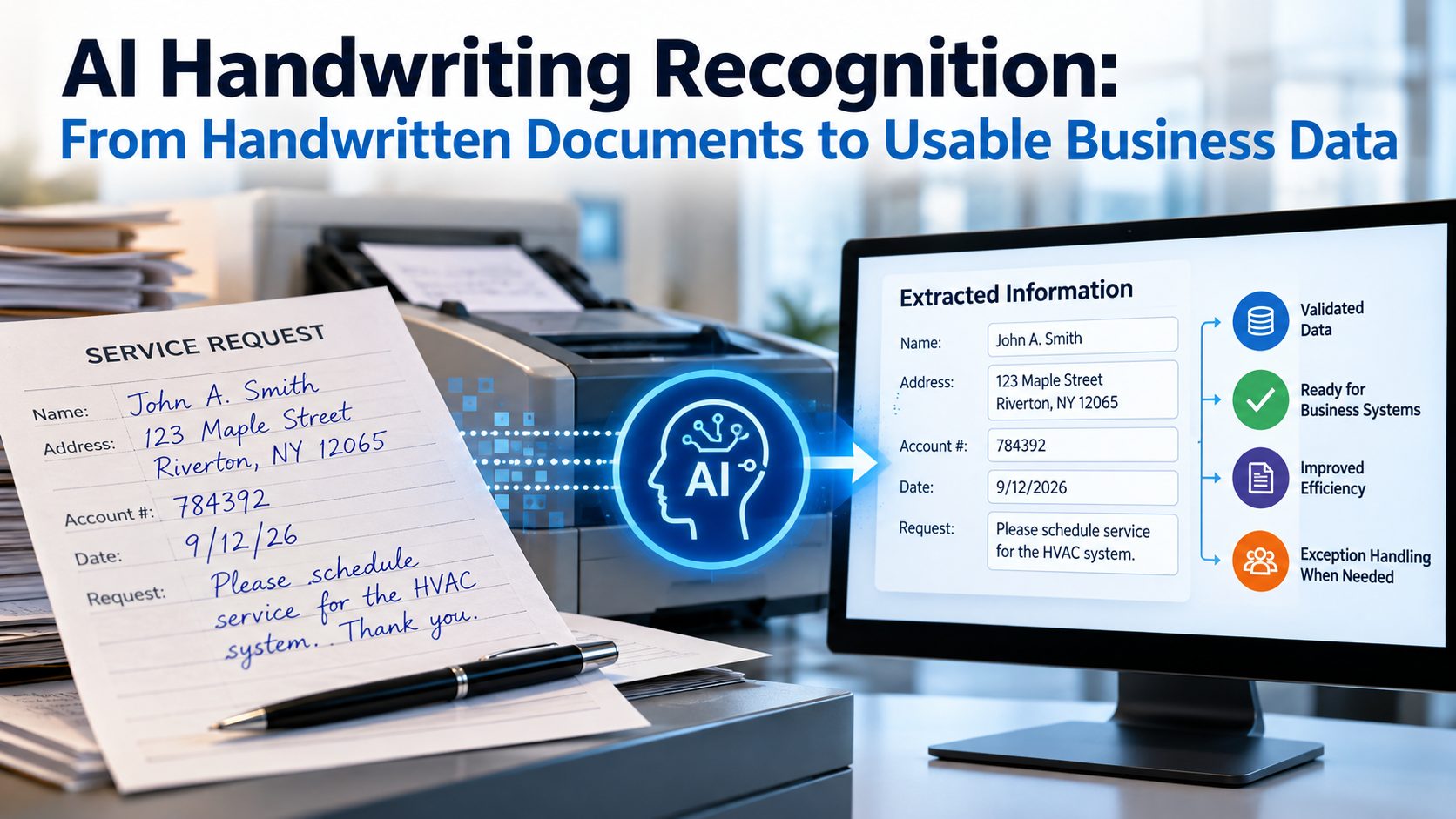
Consider a handwritten service request.
A customer fills in their name, address, account number, and a short explanation of the problem.
A recognition system may be able to identify those handwritten entries. A broader document-processing workflow can then associate the recognized information with the correct fields, check it against available records, and prepare it for further processing.
That distinction matters.
Recognizing the name written on a form is one task.
Determining that it belongs in the customer-name field is another.
Checking whether it matches an existing customer record is another.
And using the information to initiate a service request is yet another.
Handwriting recognition produces information. A well-designed workflow makes that information useful.
OCR vs. ICR vs. AI Handwriting Recognition: What’s the Difference?
Several related terms appear when researching handwriting recognition.
Although they overlap, they are not always interchangeable.
| Technology | Primary purpose | Important distinction |
|---|---|---|
| Optical Character Recognition (OCR) | Converts text in images into machine-readable text | Historically associated with printed text, although modern OCR can also recognize handwriting |
| Intelligent Character Recognition (ICR) | Recognizes handwritten characters | Often associated with handwriting on forms and structured documents |
| AI handwriting recognition | Uses machine-learning methods to recognize handwritten text | Can support more varied writing styles and document layouts, depending on the system |
| Intelligent Document Processing (IDP) | Combines recognition with other document-processing functions | May include classification, extraction, validation, and workflow integration |
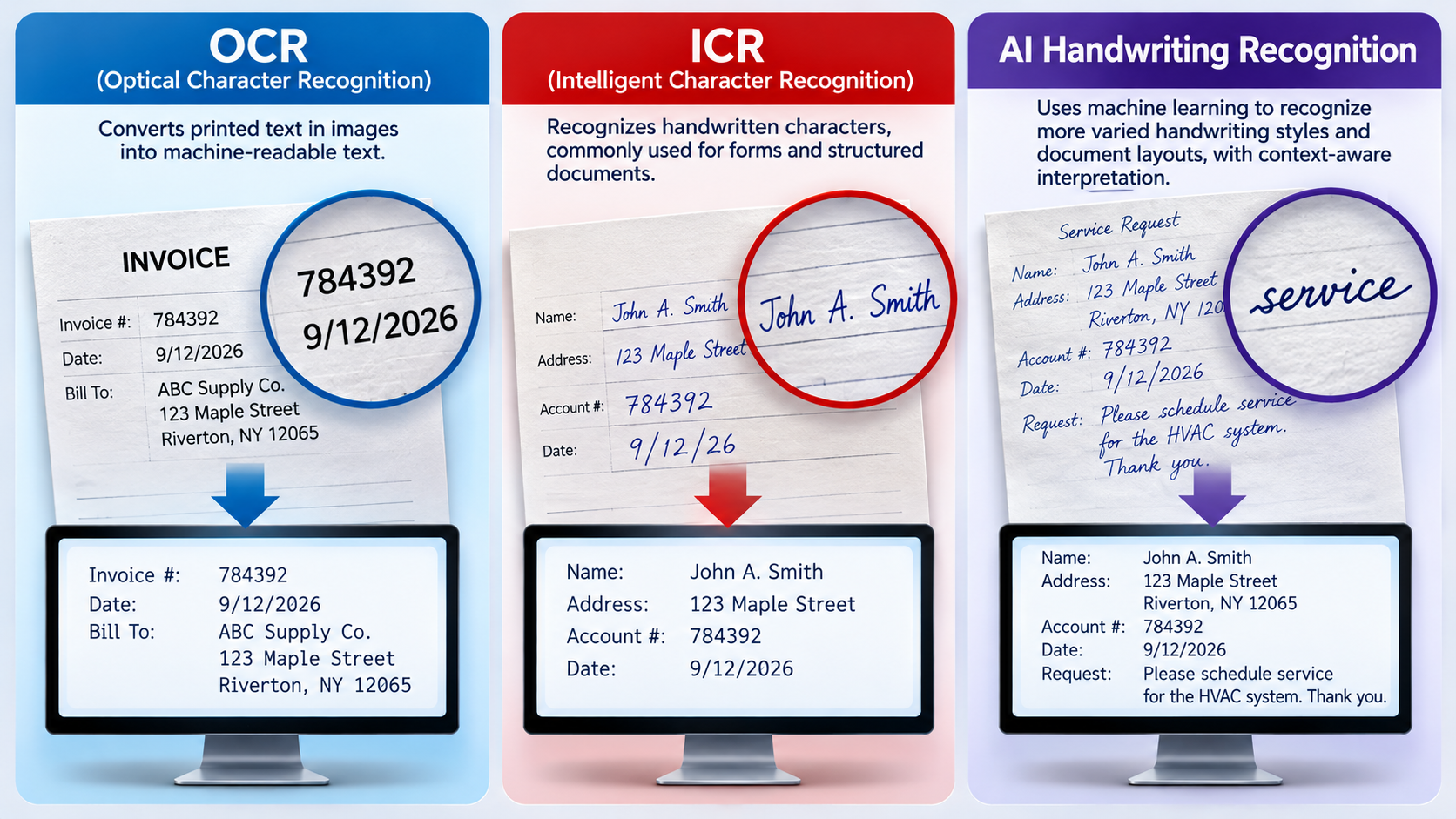
The terminology has evolved alongside the technology.
For example, modern OCR platforms from Google and Microsoft include handwriting recognition capabilities. It would therefore be misleading to suggest that OCR can only read printed characters.
Likewise, not every system described as AI handwriting recognition uses the same models or supports the same languages, document types, or writing styles.
The practical question isn’t simply whether a product uses OCR, ICR, or AI.
It’s whether the technology can recognize the organization’s actual documents and produce information suitable for the intended business process.
Why Is Handwriting So Difficult for Computers to Read?
Printed characters are usually consistent.
The letter A in one printed form generally resembles the letter A in another, particularly when the same font is used.
Handwriting is different.
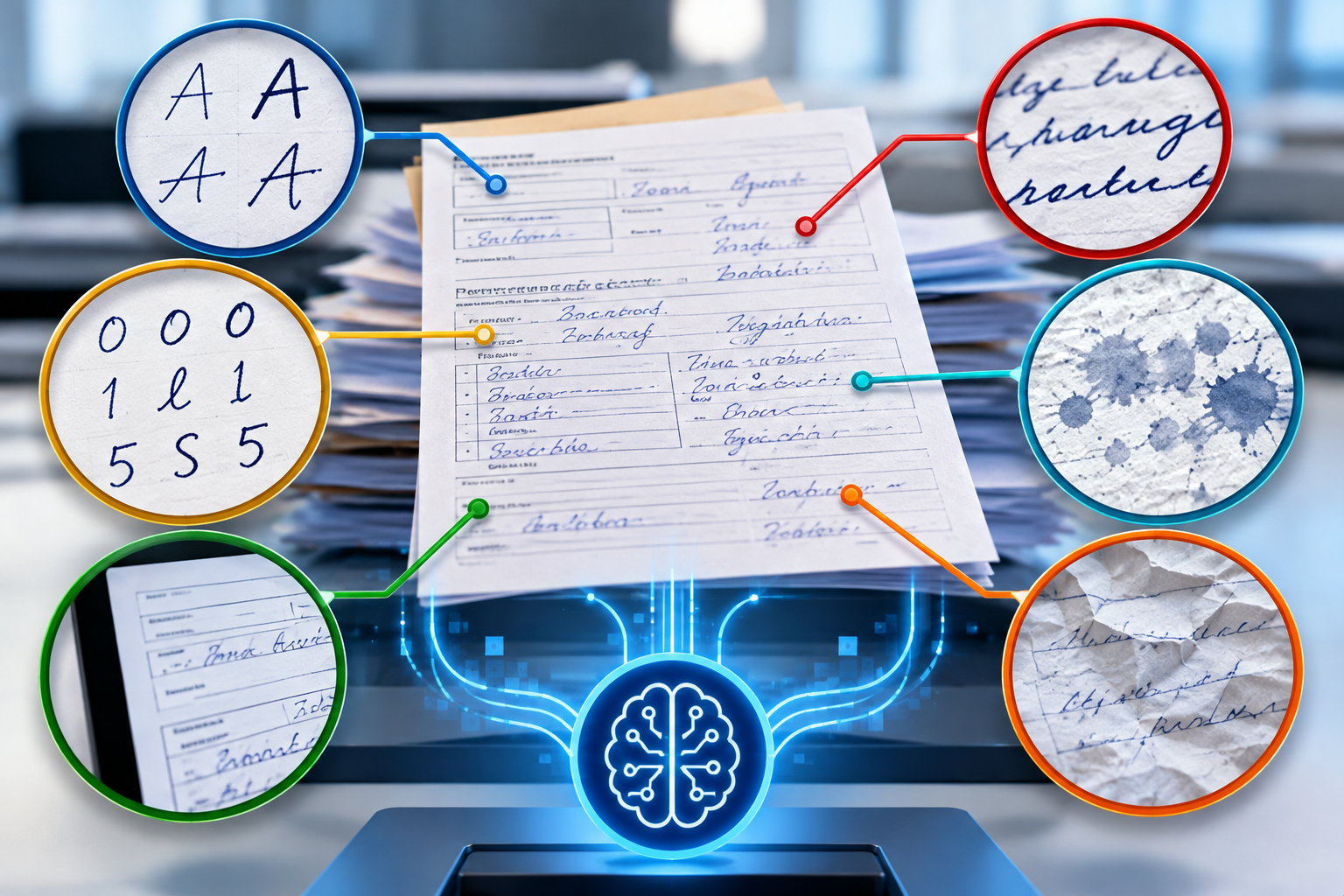
One person’s writing may be neat and carefully spaced. Another person’s letters may lean, connect, overlap, or change shape within the same sentence.
Even an individual doesn’t always write the same character consistently.
Different Writing Styles
Some people print each letter separately. Others use cursive writing. Many combine the two.
A recognition system must account for these variations without assuming every handwritten character follows one standard shape.
Similar-Looking Characters
A handwritten zero may resemble the letter O.
A one may resemble a lowercase l.
A five may resemble an S.
These differences become especially important when the information involves account numbers, dates, reference numbers, or other identifiers.
Document Quality
Handwriting recognition also depends on the quality of the captured image.
Faint ink, poor contrast, skewed pages, shadows, background patterns, and overlapping marks can make recognition more difficult.
Image preparation and capture quality therefore remain important even when advanced AI is involved.
Context Matters
Imagine a handwritten entry that appears to read either “18” or “78.”
The recognition system may identify both as plausible possibilities.
If the entry represents a quantity, date, or account-related value, additional context may help determine whether the result is reasonable.
However, context should not be treated as proof.
A plausible interpretation can still be wrong.
That’s why reliable document processing needs more than character recognition.
How AI Handwriting Recognition Fits Into Document Processing
Handwriting recognition is most useful when it operates within a connected information-processing workflow.
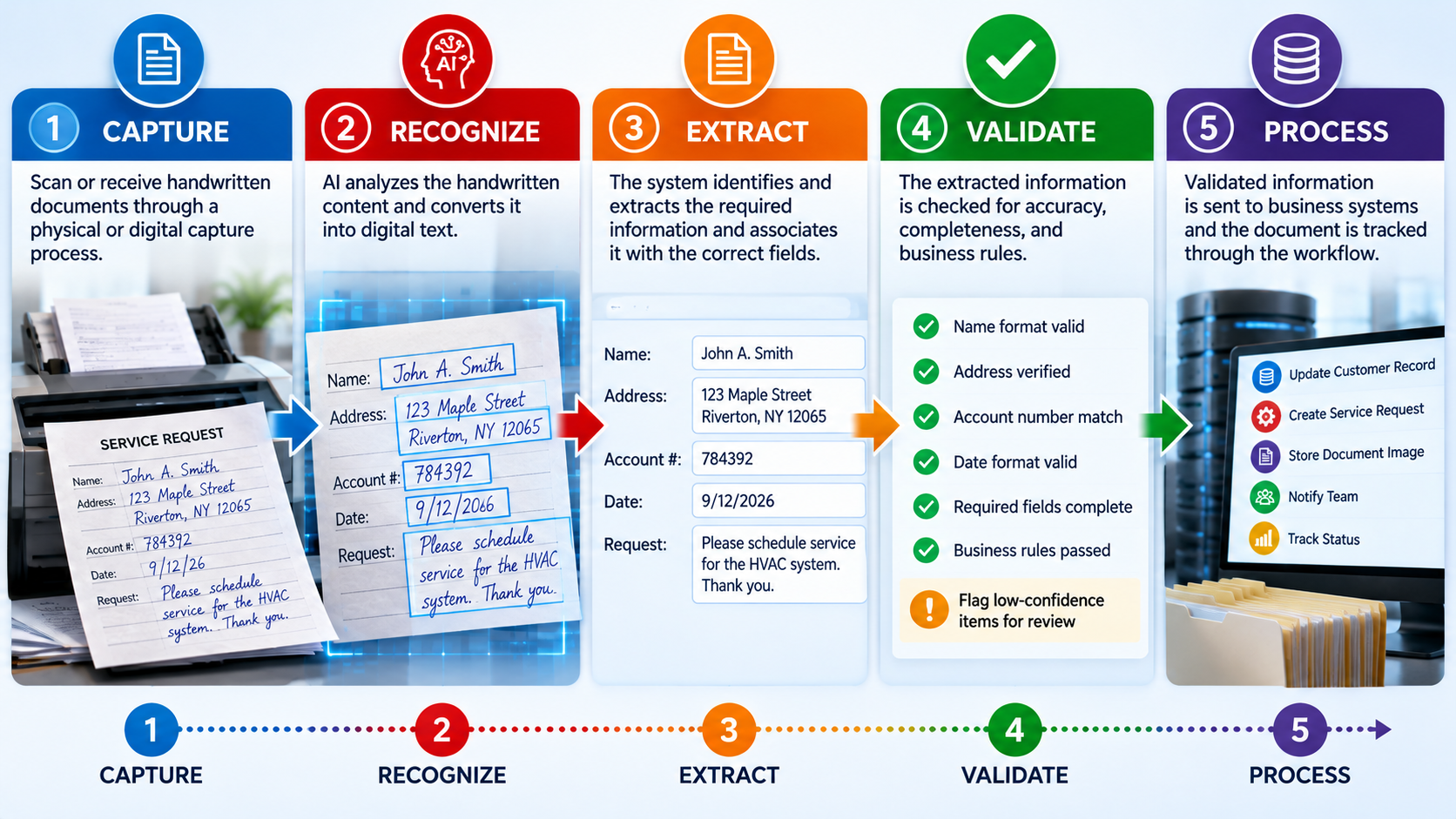
A typical process might include the following stages.
1. Capture the Document
The document enters the workflow through a scanner, imaging system, digital upload, or another supported capture method.
The goal is to produce an image suitable for recognition.
Capture quality matters because unclear images can affect everything that follows.
2. Identify the Document
Before extracting specific information, the system may need to determine what kind of document has arrived.
Is it a customer application?
A payment-related form?
A service request?
A piece of correspondence?
Document classification helps determine which information should be extracted and which processing rules should apply.
3. Recognize the Handwriting
Recognition technology analyzes the handwritten content and attempts to convert it into digital text.
Depending on the system, it may identify individual words, lines, characters, or larger text regions.
The output may also include information about where recognized text appears on the page.
4. Extract the Required Information
Not every word on a document is equally important.
A business may need the customer’s name, reference number, requested service, and date.
Intelligent extraction helps associate recognized information with those required fields.
5. Validate the Results
The extracted information can be checked against rules, expected formats, or available business records.
For example, a date can be checked for valid formatting.
An account number can be checked against an existing record when an appropriate system connection is available.
A required field can be flagged if it is missing.
6. Handle Exceptions
When the system cannot confidently determine a value, the workflow should provide a way to resolve the uncertainty.
That may involve requesting a clearer image, applying another validation step, or directing the item to an authorized reviewer.
7. Send the Information Forward
Once the required information has been appropriately validated, it can be prepared for a database, document management system, transaction-processing application, or another business workflow.
This is the broader direction explored in our article on AI Vision Intelligent Capture.
The objective isn’t merely to produce digital text.
It’s to move usable information into the process that needs it.
Recognition Accuracy Is Not the Same as Data Accuracy
This may be the most important distinction in the entire handwriting-recognition process.
A system can successfully recognize most of the words on a document and still make a mistake in the one field that matters most.
Consider a form containing a handwritten customer reference number.
If the number is interpreted incorrectly, the resulting text may look perfectly reasonable.
But it could point to the wrong customer record.
Similarly, a handwritten date may be recognized as a valid date without being the date the person actually wrote.
Readable output does not automatically mean correct information.
Organizations evaluating handwriting recognition should consider several different measurements.
| Measurement | What it tells you |
|---|---|
| Recognition accuracy | How accurately the system identifies the original handwritten content |
| Field extraction accuracy | Whether required information is correctly identified and associated with the appropriate field |
| Validation performance | Whether the workflow detects errors or inconsistencies covered by its checks |
| Exception rate | How often an item requires additional handling |
| Human review workload | How much manual verification remains necessary |
| End-to-end processing quality | Whether the final information is suitable for its intended business use |
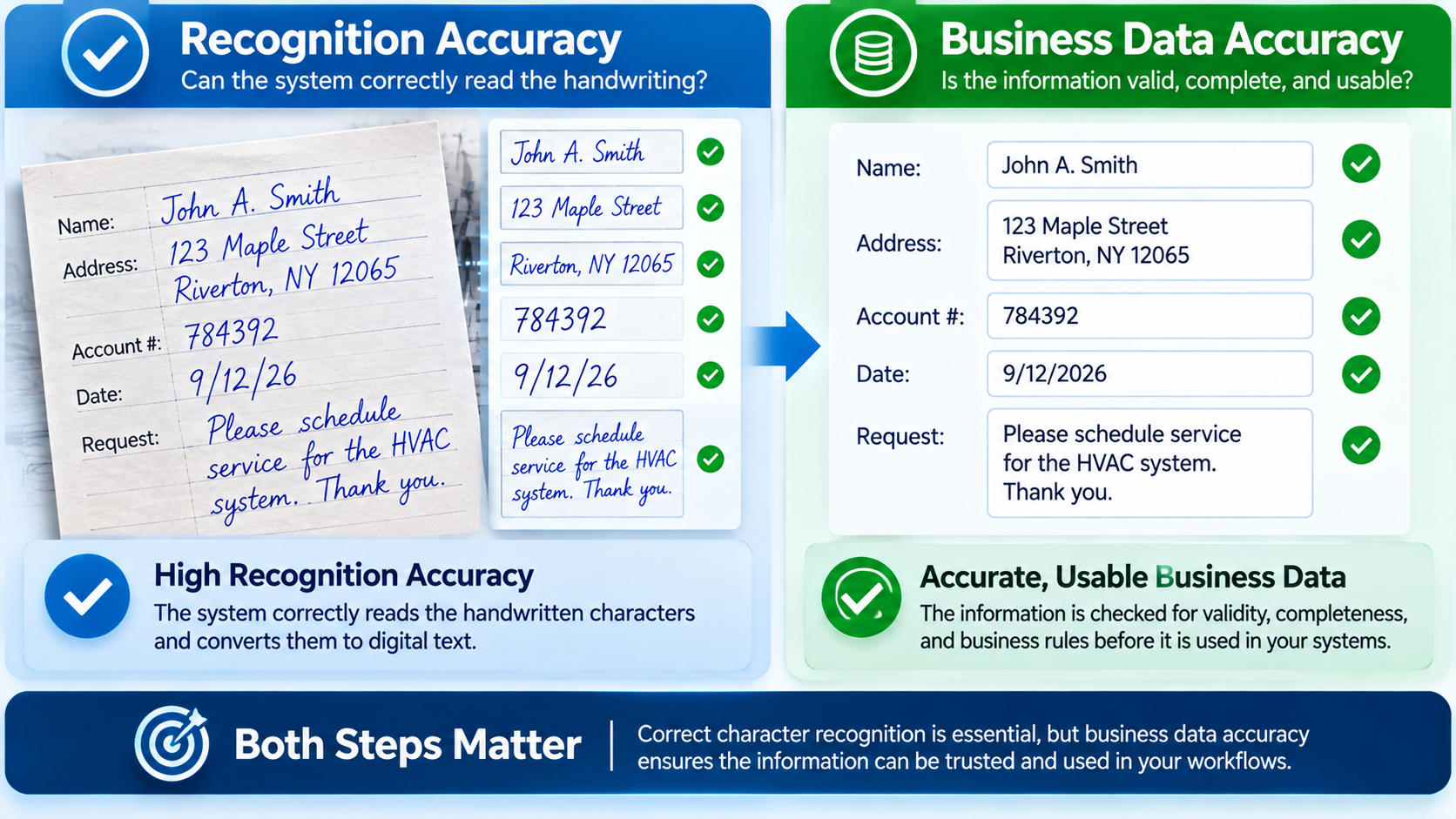
These measurements are related, but they are not identical.
A system that reads handwriting well may still need additional classification, extraction, or validation capabilities to support a complete business process.
Why Confidence Scores and Human Review Matter
Some handwriting-recognition systems provide confidence scores indicating how certain a model is about a particular result.
These scores can help determine which items deserve closer attention.
For example, a system might recognize a handwritten word with relatively high confidence while expressing greater uncertainty about a nearby account number.
The workflow could then prioritize the uncertain field for review.
However, confidence scores require careful interpretation.
A high confidence score is not a guarantee that the recognized information is correct. Scores may not be calibrated consistently across models, document types, or use cases.
The appropriate review threshold also depends on the consequences of an error.
A misspelled word in a searchable archive may be less consequential than an incorrect identifier used in a transaction.
This is why human review should be treated as a designed part of the process rather than evidence that automation has failed.
The objective is to use automation where it is dependable and provide effective exception handling where uncertainty remains.
Where Is AI Handwriting Recognition Useful?
Handwritten information appears across many different business processes.
The potential applications are broader than simply converting handwritten pages into searchable documents.
Mailroom Operations
Incoming mail may contain handwritten notes, forms, instructions, or identifying information.
Recognition technology can help convert supported handwritten content into digital information for subsequent processing.
For organizations handling physical mail, the ability to connect recognition with capture, document identification, and workflow tracking may be particularly valuable.
Customer Applications and Forms
Customers do not always complete forms electronically.
Handwritten applications may include names, addresses, dates, account references, and other information that must eventually enter a business system.
Recognition and extraction can help reduce repetitive transcription, provided the results are appropriately checked.
Payment-Related Documents
Payment workflows may include handwritten amounts, dates, names, or accompanying instructions.
These fields can require careful validation because a recognition error may affect downstream processing.
Handwriting recognition should not be confused with Magnetic Ink Character Recognition (MICR), which is a separate technology used for information encoded in the MICR line of checks.
A complete payment-processing workflow may need to handle several distinct information types.
Customer Correspondence
Letters and handwritten notes may contain useful information about a customer’s request.
Recognition can make some of that information available for search, review, classification, or subsequent processing.
Long-form handwriting can be especially challenging, so results should be evaluated against the actual types of correspondence an organization receives.
Records and Archives
Organizations maintaining older paper records may want to make handwritten information more accessible.
Recognition can support digitization and search, although historical handwriting, damaged documents, and unfamiliar writing conventions may present additional challenges.
The appropriate balance between automated recognition and manual verification depends on the records and their intended use.
What Happens After Handwriting Becomes Digital Text?
Imagine an organization receives a batch of handwritten service forms.
Converting the writing into digital text is useful, but it doesn’t complete the business process.
The organization still needs to answer several questions.
Which customer submitted the request?
What service is being requested?
Is the required information present?
Does the account reference match an existing record?
Who should handle the request?
How will the organization know whether it was processed?
These questions move the conversation from handwriting recognition to information management.
Connecting Information to Business Rules
Recognized information can be evaluated against predefined rules.
A required field might be checked for completeness.
An identifier might be compared with an authorized reference source.
An incomplete submission might be routed for follow-up.
These steps can help make recognized information more dependable before it enters downstream systems.
Supporting Document Traceability
The physical or digital document may also need to remain connected to its processing history.
Organizations may need to know when an item arrived, where it was processed, and whether additional review occurred.
That broader requirement is explored in our article on building an audit-ready document workflow.
Recognition alone does not establish traceability.
The surrounding workflow must provide the necessary tracking and recordkeeping.
Making Information Available to the Right People
The value of recognized information increases when authorized users and systems can access it at the appropriate stage.
That is one reason real-time document visibility matters in document-intensive operations.
A business needs more than extracted information.
It needs to understand where work stands and what requires attention.
Five Questions to Ask Before Implementing AI Handwriting Recognition
Handwriting recognition should be evaluated against real operational requirements, not just an impressive demonstration.
1. What Kinds of Handwriting Must Be Recognized?
Printed handwriting, cursive writing, short form entries, and long handwritten passages can present different challenges.
Organizations should test the types of documents they actually receive.
2. Which Fields Matter Most?
Not every recognized word needs the same level of accuracy or validation.
Identify the information that drives transactions, customer identification, routing, or compliance requirements.
3. How Are Uncertain Results Handled?
Ask what happens when the system cannot reliably recognize a field.
Can the item be flagged for review?
Can an authorized employee correct the result?
Is there a record of the correction?
4. How Will Performance Be Measured?
Recognition accuracy is only one consideration.
Review effort, exception handling, processing time, and downstream correction requirements can also affect operational performance.
A useful evaluation should consider the entire workflow.
5. How Will Recognized Information Reach Existing Systems?
The final output must be compatible with the applications and processes that use it.
That may require field mapping, validation rules, integration work, or changes to existing procedures.
These questions connect directly to the foundations discussed in What Makes a Document Workflow AI-Ready?.
Preparing the workflow is often just as important as selecting the recognition technology.
Why Physical Capture Still Matters in an AI-Driven Mailroom
Much of the conversation around document AI focuses on what happens after a digital image already exists.
But many organizations still receive information on physical paper.
Before handwriting can be recognized, the document must enter a controlled capture process.
This is particularly relevant to mailrooms handling incoming correspondence, forms, payments, and other paper-based information.
Agissar has an established history in the physical capture and document-processing environment.
Its IDC – Integrated Document Capture Extract connects automated mail extraction with document imaging.
INFOPointe™ provides real-time data capture capabilities associated with automated mailroom, print, and scanning equipment.
INFOPoll® Enterprise Edition supports operational data collection, throughput visibility, and tracking physical units of work through processing.
WebWarehouse® supports document tracking, status visibility, and chain-of-custody information across processing environments.
These existing capabilities help illustrate an important operational principle.
Intelligent information processing depends on more than the technology that reads a document.
Physical handling, capture, tracking, validation, and downstream processing all contribute to the overall workflow.
The technologies involved may be different, but the information must move through a connected process.
The Future of Handwriting Recognition Is About More Than Reading
Handwriting recognition has developed considerably from earlier character-recognition approaches.
Modern systems can combine recognition with document structure, contextual information, and other processing capabilities.
But the next challenge isn’t simply reading increasingly difficult handwriting.
It’s making recognized information dependable enough to support real business decisions.
That means asking questions beyond whether a system can identify a word.
Can it locate the right information?
Can it associate that information with the correct field?
Can it identify uncertainty?
Can it support validation?
Can it pass the result into an appropriate workflow?
And can the organization maintain the visibility and controls needed to manage the process?
These are the questions that turn handwriting recognition from a technical capability into a useful operational tool.
Frequently Asked Questions About AI Handwriting Recognition
Can AI read handwritten documents?
Yes. Modern AI-based recognition systems can recognize handwritten text in supported languages and document formats. Results vary with writing style, image quality, document complexity, and the particular technology used.
What is the difference between OCR and handwriting recognition?
OCR is the broader process of converting text in images into machine-readable information. Modern OCR can recognize both printed and handwritten text. Handwriting recognition focuses specifically on identifying handwritten content.
What does ICR stand for?
ICR stands for Intelligent Character Recognition. The term is commonly used for technology that recognizes handwritten characters, particularly in forms and document-processing applications.
Is AI handwriting recognition always accurate?
No. Recognition errors remain possible, particularly with unclear writing, poor images, unusual characters, or ambiguous information. Important fields may require validation or human review.
Can AI recognize cursive handwriting?
Some systems can recognize cursive handwriting, but performance depends on the model, supported language, writing style, and document quality. Organizations should test representative examples before relying on a system operationally.
Can handwriting recognition extract information from forms?
Yes, when the recognition technology is combined with suitable extraction capabilities. The system must not only recognize the writing but also identify which content belongs to each required field.
Does handwriting recognition eliminate manual data entry?
It can reduce manual transcription for suitable documents and workflows. However, exceptions, corrections, and verification may still require human involvement.
Can handwriting recognition process checks?
Handwriting recognition may help interpret handwritten information on checks, such as certain written or numeric fields. MICR processing is a separate capability, and payment workflows may require additional validation and controls.
Why is document validation important?
Validation helps identify missing, inconsistent, or potentially incorrect information before it is used by downstream systems. Recognition alone cannot establish that every extracted value is correct.
How does handwriting recognition relate to intelligent document processing?
Handwriting recognition can serve as one component of intelligent document processing. Other components may include document classification, data extraction, validation, exception handling, and workflow integration.
Key Takeaways
- AI handwriting recognition converts supported handwritten content into machine-readable text.
- Modern OCR and ICR capabilities overlap, so product labels alone do not establish performance.
- Handwriting remains challenging because writing styles, characters, and image quality vary.
- Recognizing text is different from extracting the correct business information.
- Validation and human review remain important, especially for consequential fields.
- Confidence scores can help prioritize review but do not guarantee correctness.
- Handwriting recognition can support mailroom, forms, correspondence, payment-related, and records workflows.
- Real operational value depends on how recognized information enters business processes.
- Physical capture, tracking, and document visibility remain relevant even as recognition technology advances.
- Organizations should evaluate complete workflows rather than recognition demonstrations alone.
Conclusion: From Handwriting to Information That Works
Handwritten documents aren’t disappearing anytime soon.
And for many organizations, they remain an important source of customer information, requests, instructions, and transaction-related data.
AI handwriting recognition creates new opportunities to process that information without relying entirely on manual transcription.
But the technology should be judged by more than its ability to read a page.
A successful workflow must also identify the information that matters, evaluate uncertain results, preserve appropriate controls, and deliver usable data to the systems that need it.
The progression is straightforward:
Capture → Recognize → Extract → Validate → Process
Each stage contributes something important.
Recognition makes handwriting accessible to digital systems.
Validation helps establish whether the information is dependable.
And connected processing gives that information a purpose.
The future of handwriting recognition isn’t simply about reading what someone wrote.
It’s about turning handwritten information into something an organization can reliably use.
Contact Agissar to learn more about document capture, mailroom automation, and solutions for managing information throughout the processing workflow.
Table of Contents
Share This!
Related Posts




Agissar not only has a history of game-changing advances in the mail extraction industry, we also have a stellar reputation for excellent products, services and attention to detail that has been built over decades. It shows in our relationships with suppliers, clients, and our ability to get excellent value for your dollar while supporting a wide range of mailing, imaging, and office products from the simple to the complex. We can custom tailor service programs to meet your needs and help you get to the top of your industry, all you need to do is contact us today!