
For decades, Optical Character Recognition has helped organizations answer an important question:
What does this document say?
OCR made it possible to convert text contained in scanned images into machine-readable information.
That was a major step forward.
Instead of treating a scanned page only as a picture, organizations could search its text, index information, retrieve content, and feed recognized data into other processes.
But modern document workflows often need answers to much more complicated questions.
What type of document is this?
Where is the important information located?
Which information matters?
Is the content printed, handwritten, encoded in a barcode, or associated with a check?
Does the document’s layout provide context?
Where should the information go next?
These questions illustrate an important evolution in document automation.
Recognition remains essential.
But recognition alone is no longer the destination.
Organizations increasingly need capture environments that can recognize information, establish context, classify what has arrived, extract useful data, manage uncertainty, and connect information with the process that needs it.
This broader direction is what we mean here by AI Vision Intelligent Capture.
It isn’t simply about reading more characters.
It is about turning visual information into usable business information.
What Is AI Vision Intelligent Capture?
“AI Vision Intelligent Capture” is best understood as an emerging approach rather than a single universally standardized technology category.
It describes a capture environment in which technologies for visual and document analysis work alongside OCR, classification, data extraction, validation, and workflow automation to make incoming information more useful.
That distinction matters.
Traditional document capture might follow a relatively simple path:
Scan → OCR → Store
A more intelligent capture process can extend the journey:
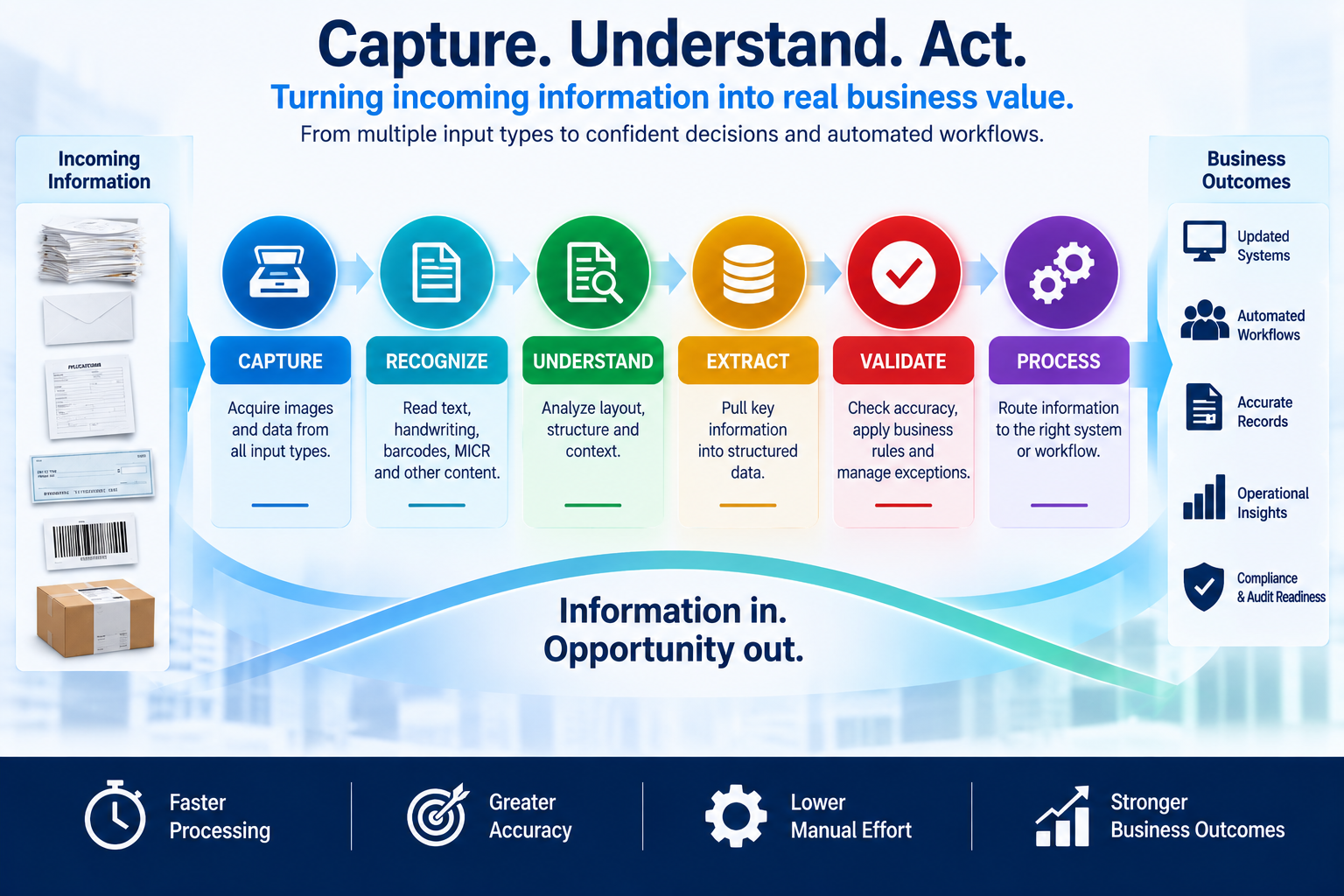
Capture → Recognize → Understand → Classify → Extract → Validate → Process
The goal isn’t merely to create a digital copy.
It is to understand enough about incoming information to determine what it is, which information matters, and what should happen next.
This builds directly on the principles of an AI-ready document workflow.
AI can add powerful capabilities, but useful automation still depends on the quality of the information and the workflow surrounding it.
OCR Is Still Important—But It Solves a Specific Problem
The rise of document AI does not make OCR obsolete.
Quite the opposite.
OCR remains an important building block within many modern document-processing systems.
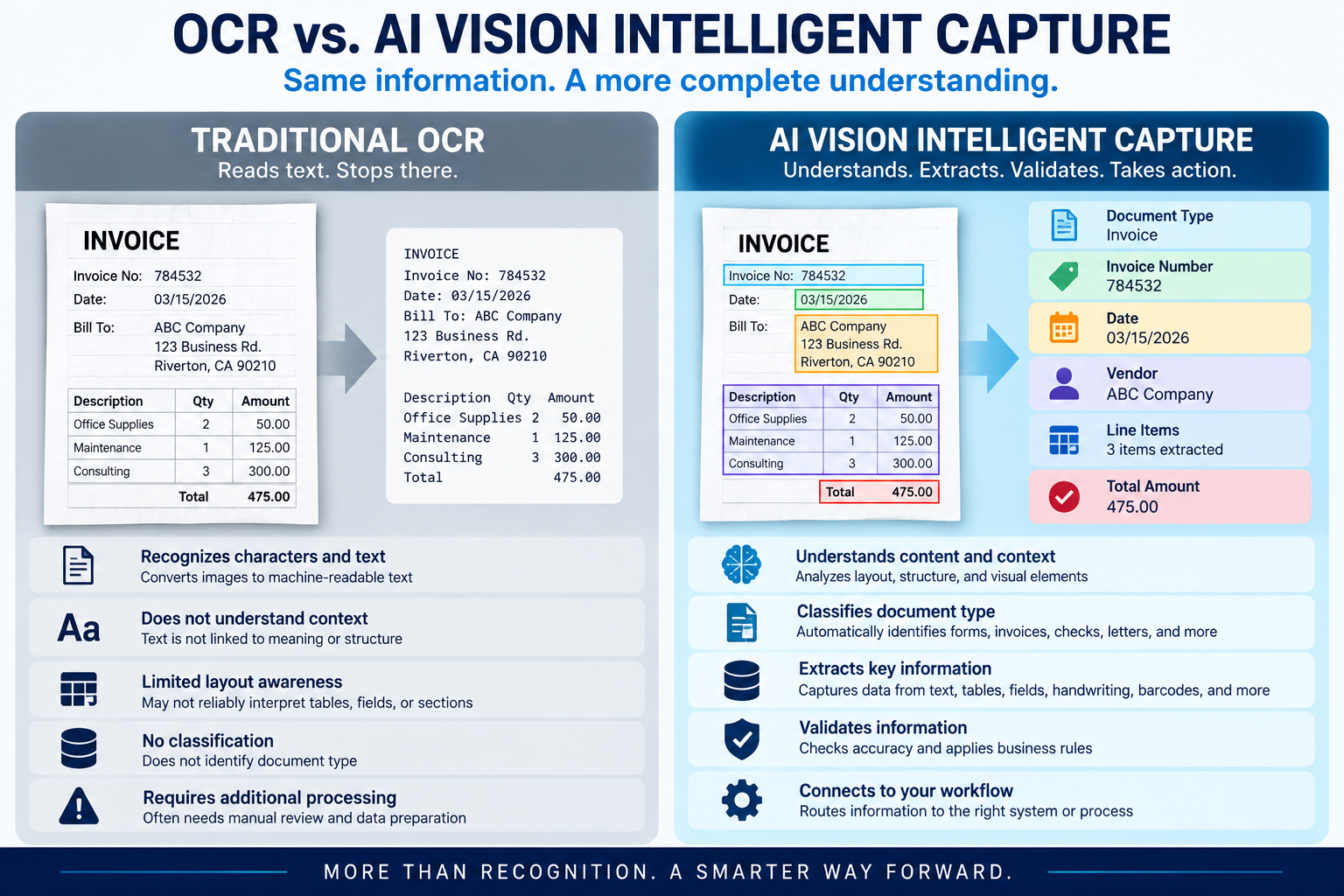
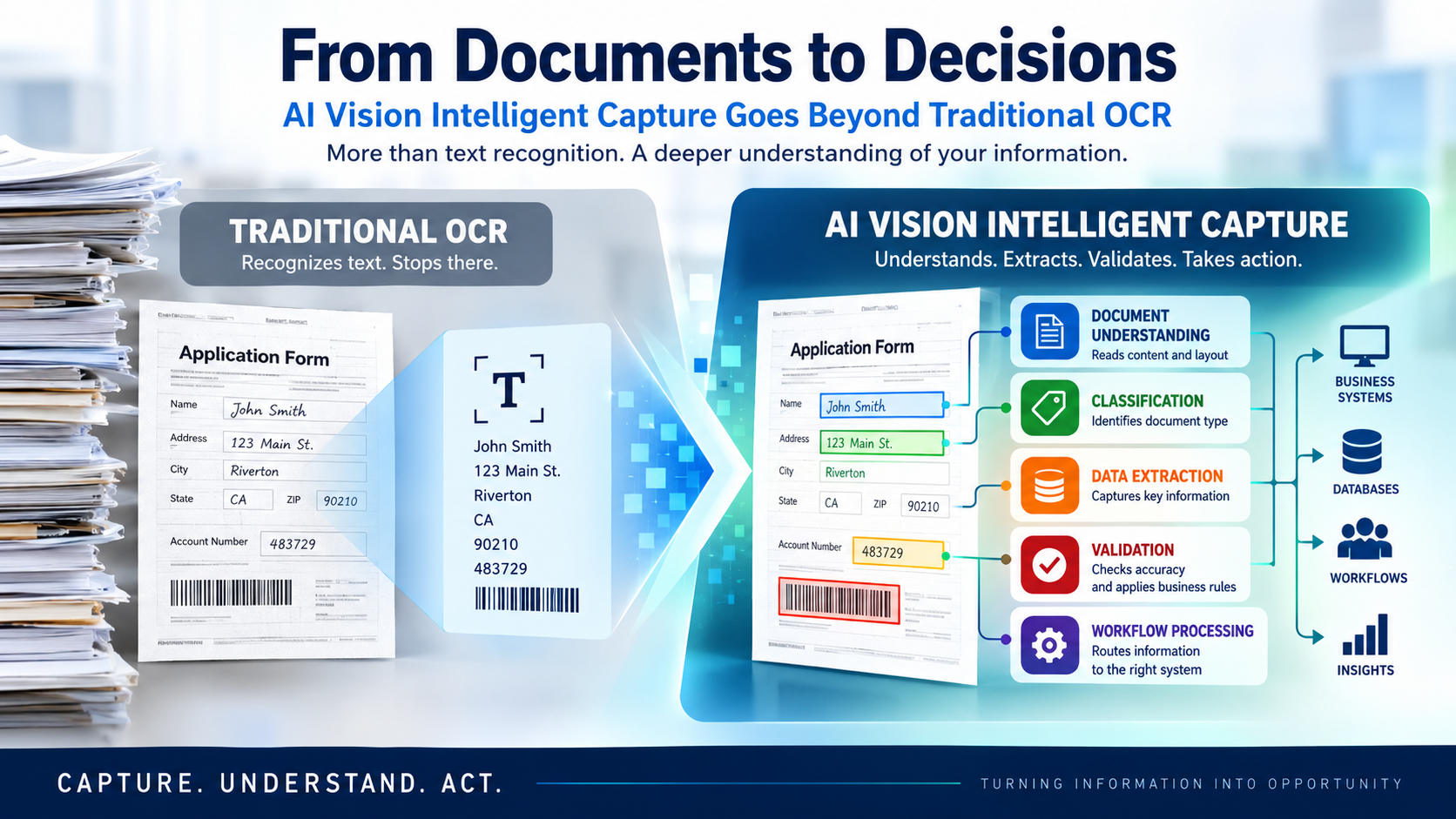
At its most basic level, OCR converts text contained in an image into machine-readable characters.
Consider a scanned application containing:
Account Number: 483729
OCR may recognize the words “Account Number” and the characters “483729.”
That is useful.
But the business process may still need additional answers.
Is this an application?
Does 483729 belong to the account-number field?
Does this page belong to another page in the same transaction?
Are required fields present?
Does the information need validation?
Where should the document go next?
OCR gives the system recognized characters.
Intelligent capture adds context and workflow around those characters.
This distinction is central to understanding how AI and machine learning are changing document capture.
From Reading Characters to Understanding Document Structure
Documents communicate through more than words.
Layout carries information too.
A heading has a different role from a paragraph.
A value beside a field label may be related to that label.
Rows and columns create relationships inside a table.
A checkbox can communicate a choice.
Position can help show which pieces of information belong together.
Modern document-analysis technologies can therefore work with more than recognized text.
Depending on the system, they may identify or preserve structural elements such as:
- Paragraphs
- Headings
- Tables
- Selection marks
- Page regions
- Lists
- Figures
- Relative positioning
- Relationships between document elements
This is one of the important ways modern document AI can go beyond basic character recognition.
Instead of treating a page simply as a stream of characters, document-analysis technologies can use structure and layout to provide additional context.
That context can make captured information much more useful.
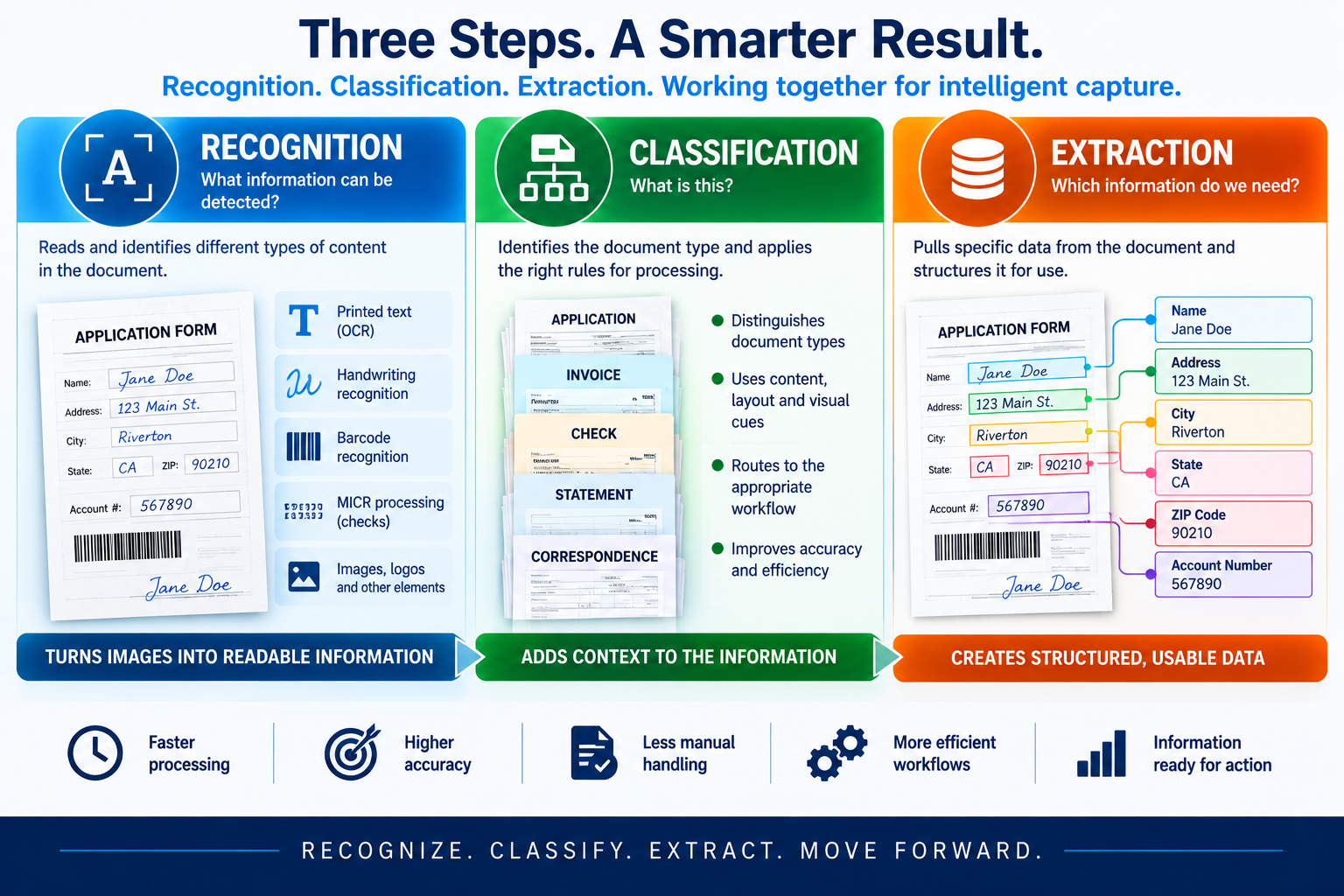
Recognition, Classification, and Extraction Are Different Jobs
These terms are often grouped together.
They should not be treated as identical.
Recognition asks:
What information can be detected?
OCR, handwriting recognition, barcode decoding, MICR processing, and other recognition technologies may contribute here.
Classification asks:
What is this?
The system may need to distinguish an application from correspondence, a check, a claim, an invoice, or another document type.
Extraction asks:
Which information do we need?
Once the document or information type is known, the workflow may need to extract specific data such as:
- Name
- Account number
- Date
- Transaction amount
- Reference number
- Form value
- Barcode value
- Check information
Recognition, classification, and extraction can work together, but they solve different problems.
Recognition makes information machine-readable.
Classification gives that information context.
Extraction identifies what matters to the business process.
Understanding these differences is essential when evaluating intelligent capture technology.
Where Does “Vision” Enter the Picture?
The word “vision” deserves careful treatment.
In artificial intelligence, computer vision broadly refers to technologies that analyze visual information.
Documents are visual objects.
Their text matters, but so can their layout, position, structure, marks, labels, tables, images, and relationships between elements.
Modern document AI can therefore use visual and structural information alongside recognized text to interpret content with greater context than basic text recognition alone.
Some current document-processing systems also use multimodal or generative AI models capable of working with combinations of textual and visual information.
But that does not mean every intelligent-capture platform uses the same architecture.
It also does not mean that every product described with the words “AI Vision” uses a particular type of AI model.
That is why buyers should look beyond the label and ask practical questions.
What can the system actually recognize?
What kinds of information can it classify?
Which data can it extract?
How does it deal with uncertain results?
Can captured information move into the business process that needs it?
Those questions tell an organization much more than the words “powered by AI.”
Intelligent Capture Is About More Than Documents
Even the word “document” can sometimes be limiting.
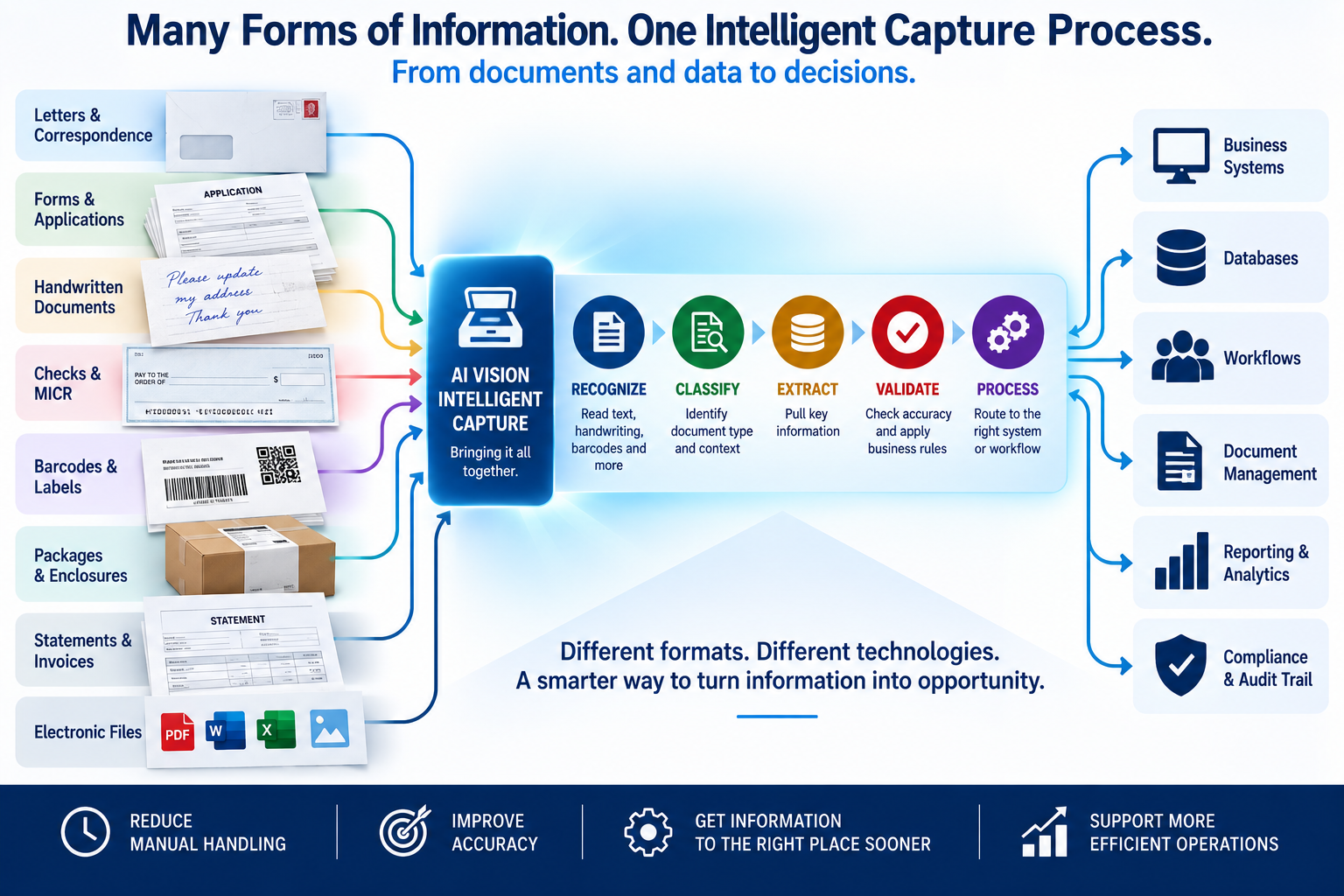
Business information arrives in many forms.
Organizations may need to process:
- Letters
- Applications
- Forms
- Handwritten notes
- Checks
- Barcodes
- Labels
- Packages
- Statements
- Correspondence
- Scanned images
- Electronic files
Different inputs may require different recognition methods.
Printed text may be processed through OCR.
Handwritten content requires recognition technology capable of working with handwriting.
Barcodes require decoding.
Checks may involve MICR information together with printed or handwritten content.
Labels and packages may combine printed information, identifiers, and barcodes.
The question therefore becomes broader than:
“Can we scan this document?”
A more useful question is:
“Can we capture the information entering this process and turn it into something useful?”
That is the larger opportunity behind intelligent capture.
How Handwriting Changes the Capture Problem
Handwriting is an excellent example of why document capture cannot be reduced to conventional printed-text recognition.
Printed characters tend to be relatively consistent.
Handwriting is much more variable.
Letter shapes differ.
Characters can touch.
Words may be abbreviated.
Writing can be slanted, faint, crowded, or inconsistent.
Modern recognition systems can process handwriting in supported circumstances, but results depend on the technology, supported languages, handwriting itself, and the quality of the captured image.
That means handwriting recognition should not be treated as perfect recognition.
An intelligent workflow needs a way to deal with uncertainty.
Depending on the system and process, that may involve:
- Confidence information
- Validation rules
- Exception handling
- Human review
- Correction
This leads to an important principle:
Intelligent capture isn’t only about recognizing information. It also needs a responsible way to handle information that cannot be interpreted confidently.
Checks Require More Than General OCR
Checks provide another good example of mixed information.
A check can contain several information types, including:
- MICR information
- Printed text
- Handwritten information
- Numeric amounts
- Dates
- Account-related information
- Other identifiers
MICR and OCR should not be treated as interchangeable technologies.
The MICR line is specifically associated with machine-readable information used in check processing and can contain routing, account, check and other check-related information.
OCR, by contrast, is used to recognize visually represented characters.
Depending on the application, check capture may therefore involve more than one recognition or processing method.
That makes check processing a useful example of why intelligent capture increasingly involves coordinating several information technologies rather than relying on one recognition tool.
Barcodes Add Another Machine-Readable Layer
Barcodes solve a different information problem.
A barcode encodes information in a machine-readable visual form.
Within a workflow, a barcode might identify:
- A document
- A transaction
- A package
- An account
- A case
- A product
- A routing destination
- Another business identifier
Barcode recognition can therefore complement OCR and classification.
For example, a barcode may identify a transaction while OCR captures printed information from the same item.
The value comes from making those information sources useful together.
Why Classification Matters So Much
Imagine an incoming batch containing several different document types.
The system could recognize every printed word correctly and still leave someone with an important manual task:
figuring out what each document is.
Classification addresses that problem.
Once a document type has been identified, different processing paths can be applied.
An application can follow one workflow.
A check can follow another.
Correspondence can be routed somewhere else.
A particular form can trigger a specific extraction process.
Classification therefore acts as a bridge between recognition and automation.
It provides context needed to decide what happens next.
Extraction Turns Visual Information Into Usable Data
Recognizing a page full of text does not necessarily mean the organization has the information it needs.
Imagine a form containing hundreds of words.
Perhaps only six fields matter to the downstream transaction.
Intelligent extraction focuses on identifying those fields.
Instead of returning a large block of recognized text, the system may produce structured information such as:
Customer Name:
Account Number:
Transaction Date:
Amount:
Reference Number:
Document Type:
Structured information can be easier for downstream systems and workflows to use.
This is one of the important differences between simply digitizing information and making captured information actionable.
It also connects directly with the problem of unstructured documents.
The challenge is not necessarily that information is missing.
Often, the information exists but lacks the structure or context needed for another system to use it efficiently.
Validation Is Part of Intelligence Too
A system should not assume every result is correct merely because AI produced it.
Recognition may be uncertain.
A required field may be missing.
A document may not match an expected category.
A value may violate a business rule.
An image may be difficult to interpret.
Responsible intelligent capture therefore needs mechanisms for dealing with uncertainty and exceptions.
Depending on the technology and application, these can include validation rules, confidence information, exception queues, human review, and correction processes.
This matters especially when accuracy, traceability, financial transactions, or regulated information are involved.
The objective is not blind automation.
It is useful automation with appropriate controls.
That principle also supports an audit-ready document workflow.
Automation becomes more valuable when an organization can determine what happened, where an exception occurred, and when human intervention was required.
Intelligent Capture Should Lead Somewhere
One of the biggest differences between basic scanning and intelligent capture appears after information has been recognized.
A scanned document can simply become a stored image.
Captured information can potentially do much more.
It may:
- Trigger a transaction
- Enter another business system
- Start a workflow
- Update a record
- Route work to a department
- Create an exception
- Join an existing case
- Support reporting
- Become part of an audit trail
Information becomes most useful when capture connects to the process that needs it.
From Capture to Transaction
This distinction becomes particularly important in document-intensive operations.
The real business objective is rarely:
“We need to OCR more pages.”
The objective is more likely:
“We need to process the information arriving on those pages.”
That changes how capture should be evaluated.
Instead of measuring success only by pages scanned or characters recognized, organizations can also ask:
- Was the correct information type identified?
- Was required data captured?
- Did the information reach the appropriate workflow?
- Was an exception created when necessary?
- Can the transaction be traced?
- Where did processing slow down?
- Can managers see what is happening?
This connects intelligent capture directly with real-time document visibility.
As automation takes on more responsibility for incoming information, the ability to see what happened becomes more—not less—important.
What AI Vision Intelligent Capture Does Not Mean
Rapid growth in AI terminology makes it useful to establish some boundaries.
AI Vision Intelligent Capture does not automatically mean:
Every document can be processed without human review.
Some information will still require validation or judgment.
It does not mean:
OCR is obsolete.
OCR remains an important recognition technology.
It does not mean:
Every AI Vision platform uses the same AI models.
Different systems can use different technologies and architectures.
It does not mean:
Every visual input can be understood perfectly.
Image quality, document complexity, handwriting, configuration, content type and the capabilities of the technology can all affect results.
And it does not mean:
AI alone creates an intelligent workflow.
As discussed in What Makes a Document Workflow AI-Ready?, strong capture, validation, integration, visibility, traceability, and measurement remain important.
AI is part of the system.
It is not the entire system.
The Evolution From Document Capture to Information Capture
The progression can be viewed simply.
Traditional scanning
Paper → Image
OCR-enabled capture
Paper → Image → Machine-readable text
Intelligent document capture
Document → Recognition → Classification → Extraction → Validation
AI Vision Intelligent Capture
Visual information → Recognition + Context → Structured Information → Processing → Action
This does not mean every organization needs the most advanced approach.
Different workflows require different levels of automation.
But the progression illustrates how the purpose of capture is changing.
The goal is increasingly not merely to digitize documents.
It is to make incoming information usable sooner.
Why This Evolution Matters to Modern Operations
Organizations continue to receive important information through physical and digital channels.
The challenge is not simply storing it.
The challenge is turning it into something the organization can use.
When incoming information requires manual sorting, manual interpretation, repeated data entry and manual routing, every additional step consumes time and operational effort.
Intelligent capture creates an opportunity to move some of that interpretation closer to the point where information enters the organization.
Depending on the workflow and technology, that can help organizations:
- Reduce repetitive manual handling
- Route information sooner
- Make structured data available earlier
- Identify exceptions earlier
- Improve process visibility
- Support more consistent downstream workflows
The outcome will depend on the technology, incoming information, implementation and business process.
But the direction is important.
Capture is moving closer to understanding.
And understanding is moving closer to action.
Agissar’s Path From Physical Capture Toward Intelligent Information Processing
For Agissar Corporation, this evolution has a logical operational foundation.
Agissar has long worked at the point where physical information enters document-processing workflows.
Its IDC – Integrated Document Capture Extract connected automated mail extraction equipment with scanners for capturing inbound-document images in mailroom operations.
INFOPointe™ provides real-time data capture and interfaces with the INFOPoll® Enterprise Edition software platform. It can be installed on automated mailroom, print, and scanning equipment.
INFOPoll Enterprise extends that operational picture with real-time data collection, process measurement, physical unit-of-work tracking, chain-of-custody capabilities, and integration between INFOPoll batches and image-capture platforms.
WebWarehouse® extends document and component visibility by tracking status, location, previous handling and chain-of-custody information, while also offering integration capabilities through its API.
Together, those technologies illustrate an important principle:
Information processing begins before information reaches its final business application.
Physical items arrive.
Documents are extracted.
Images are captured.
Operational data is collected.
Items are tracked.
Status is measured.
Information moves to the next stage.
The emerging AI Vision Intelligent Capture model extends that progression by bringing more recognition, context, classification and extraction capability closer to the point where information enters the workflow.
The Bigger Shift: Capture. Understand. Act.
The most important change may ultimately be conceptual.
For years, document automation focused heavily on converting physical documents into digital images.
OCR made the content of those images machine-readable.
Classification helped identify what had arrived.
Extraction made specific information more usable.
Modern document AI is extending those capabilities by working with combinations of recognized text, document structure, layout, classification and increasingly sophisticated visual context.
That changes the question organizations can ask.
Not simply:
“How do we digitize this?”
But:
“What is this information, what matters about it, and what should happen next?”
That is the opportunity behind AI Vision Intelligent Capture.
Not AI for its own sake.
Not the elimination of OCR.
Not automation without controls.
But a broader capture environment in which recognition, context, classification, extraction, validation, and workflow processing work together.
Capture. Understand. Act.
That is an emerging direction in intelligent capture.
Frequently Asked Questions
What is AI Vision Intelligent Capture?
AI Vision Intelligent Capture is a useful term for an emerging approach that combines visual and document analysis with technologies such as OCR, classification, data extraction, validation, and workflow processing to turn incoming visual information into usable structured information.
Is AI Vision the same as OCR?
No. OCR is primarily concerned with recognizing characters or text from images. Modern document-analysis systems can also work with layout, structure, classification, relationships between elements, and other context.
Does AI Vision replace OCR?
Not necessarily. OCR can remain an important component of an intelligent-capture environment. More advanced document technologies can add capabilities around OCR rather than simply replace it.
Can intelligent capture recognize handwriting?
Some modern recognition systems can process handwriting in supported use cases. Results depend on factors including image quality, handwriting characteristics, language support, and the technology being used.
Can intelligent capture process checks and MICR information?
Capture workflows can combine technologies for check imaging, MICR processing, OCR, and other recognition tasks. Specific capabilities depend on the platform and application.
Can intelligent capture read barcodes?
Barcode recognition is commonly used alongside other capture technologies. Barcode information can provide identifiers, routing information, transaction data, or other encoded values.
What is the difference between document classification and data extraction?
Classification determines what type of document or information has been received. Extraction identifies specific information within it that is needed by the business process.
Why is validation important in AI document capture?
Recognition and AI technologies can produce uncertain or incorrect results. Validation rules, confidence information, exception handling, and human review can help manage those situations.
Is intelligent capture only useful for paper documents?
No. Depending on the platform and workflow, intelligent capture can work with scanned paper, PDFs, images, forms, electronic documents, and other visual information.
What happens after information is captured?
Captured information can potentially enter another workflow or system, initiate a transaction, update a record, create an exception, support reporting, or become part of a traceable business process.
Key Takeaways
- OCR remains important, but character recognition is only one part of modern intelligent capture.
- Document layout and structure can provide context that recognized characters alone may not provide.
- Recognition, classification, and extraction perform different jobs.
- Handwriting, checks, MICR, barcodes, forms, labels, and other inputs may require different recognition technologies.
- Intelligent capture needs a strategy for validation and exceptions.
- Structured information becomes more useful when it connects directly to business processes.
- “AI Vision” should be evaluated by practical capabilities rather than treated as an undefined AI marketing label.
- Modern capture is evolving from digitizing documents toward understanding and processing incoming information.
- AI does not eliminate the need for good capture, integration, traceability, measurement, or appropriate human review.
- The ultimate objective is not simply to read information. It is to make that information useful.
Conclusion
OCR transformed document processing by allowing computers to recognize characters contained in images.
That remains enormously useful.
But organizations increasingly need more.
They need to identify what has arrived.
They need to understand which information matters.
They may need to deal with handwriting, barcodes, checks, forms, labels, and mixed information.
They need to manage uncertain results.
And they need captured information to move into the processes where useful work happens.
That is the broader opportunity behind AI Vision Intelligent Capture.
The progression is no longer simply:
Paper → Image → Text
It is increasingly becoming:
Information → Understanding → Action
And as capture moves closer to understanding, the boundary between document capture and intelligent business processing becomes increasingly important.
Contact Agissar to learn more about intelligent capture, document automation, and solutions for moving information efficiently from the mailroom into the processes that need it.
Table of Contents
Share This!
Related Posts




Agissar not only has a history of game-changing advances in the mail extraction industry, we also have a stellar reputation for excellent products, services and attention to detail that has been built over decades. It shows in our relationships with suppliers, clients, and our ability to get excellent value for your dollar while supporting a wide range of mailing, imaging, and office products from the simple to the complex. We can custom tailor service programs to meet your needs and help you get to the top of your industry, all you need to do is contact us today!