
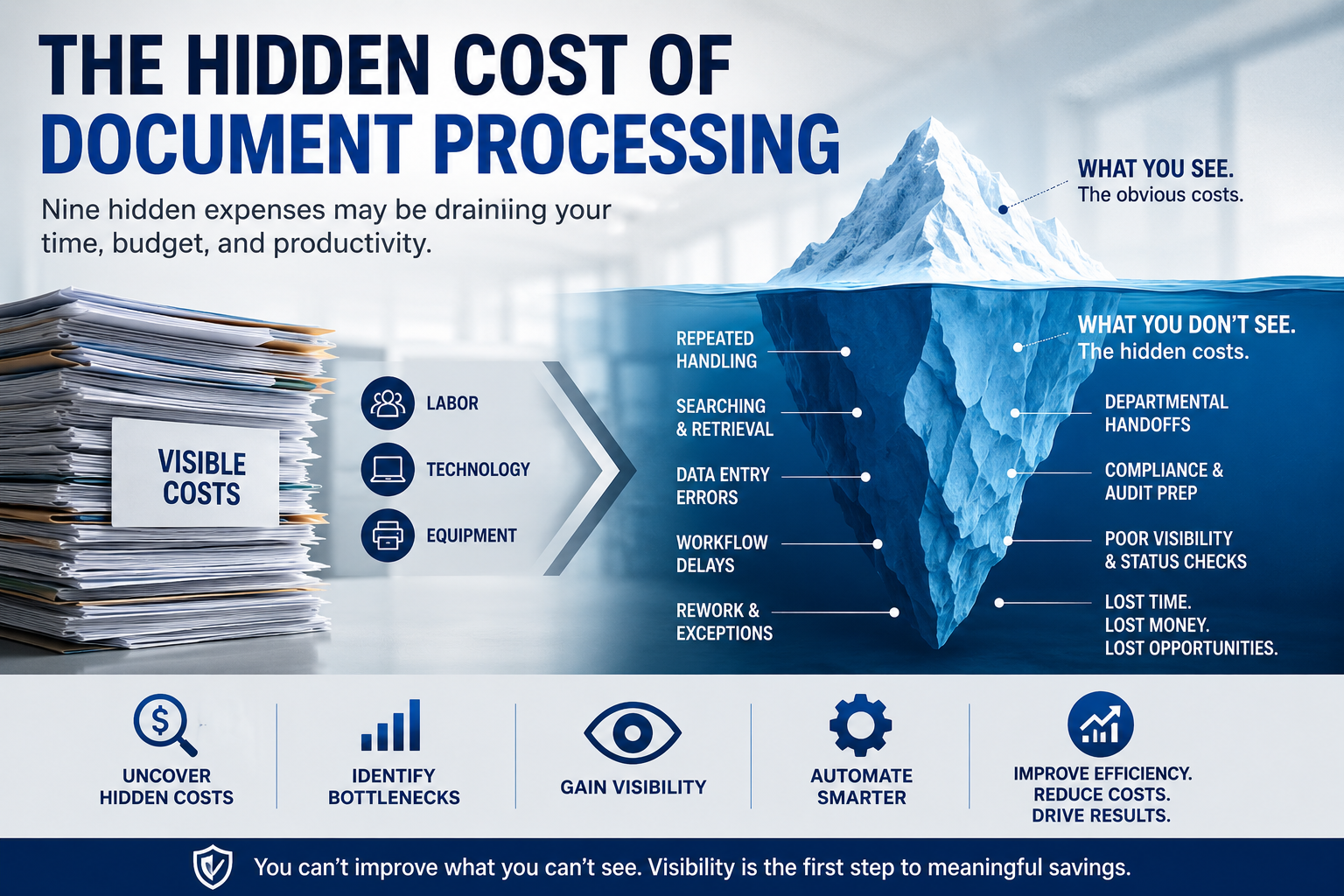
The cost of processing a document rarely appears on a single invoice.
There is no neat line item labelled “time spent looking for missing paperwork.” Delayed approvals do not always have their own budget category. Rework, duplicate handling, status calls, and workflow interruptions can quietly blend into everyday operations.
That is what makes document processing costs so difficult to see.
An organization may know what it spends on employees, scanners, storage, software, and mailroom equipment. But those numbers do not always reveal the cost of the workflow itself.
Every time a document is touched, searched for, corrected, rerouted, or left waiting, time is being consumed.
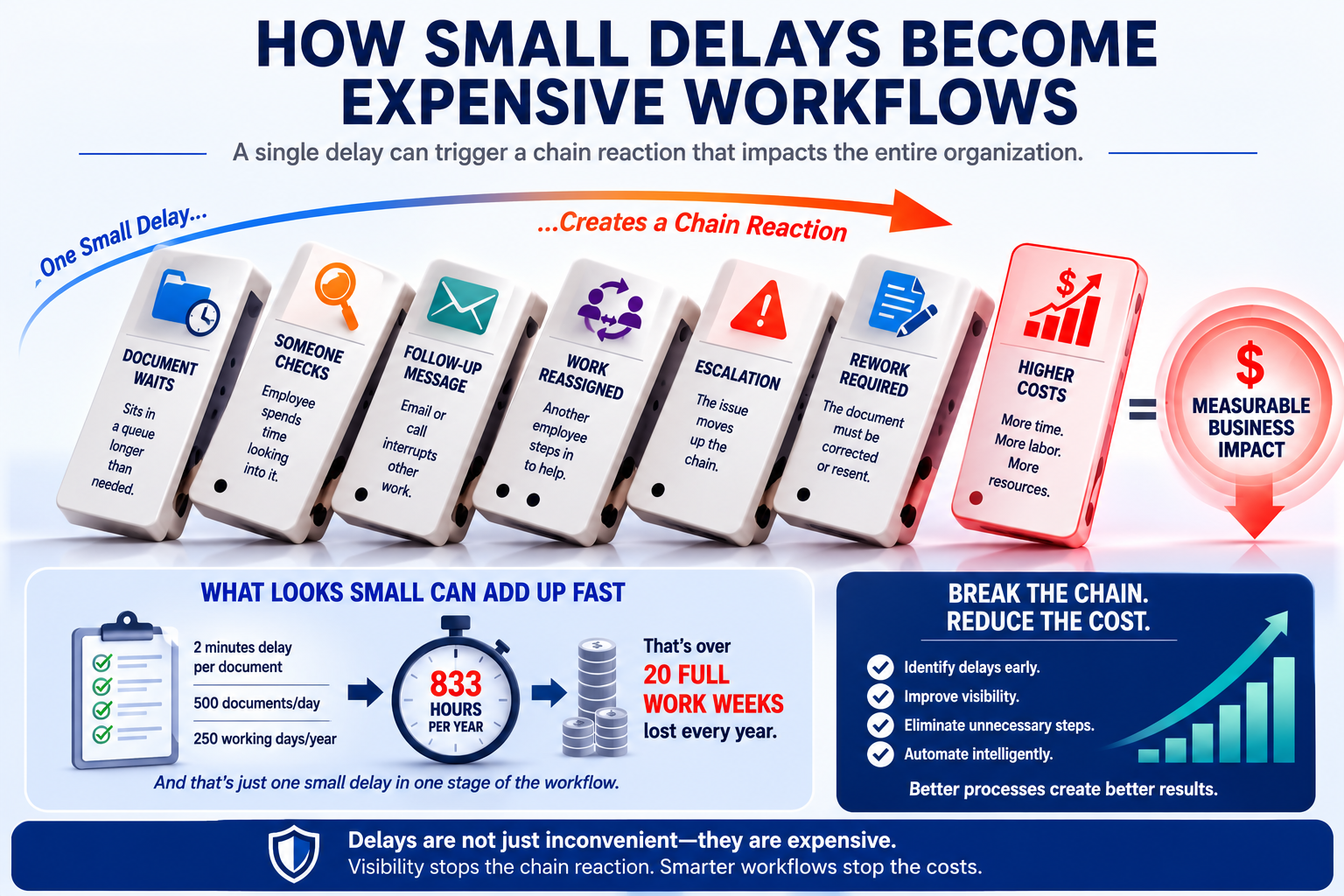
Sometimes the individual delay is only a few minutes.
Multiply those minutes across hundreds or thousands of documents, multiple employees, and an entire year, and small inefficiencies can become significant operational expenses.
Understanding where document processing costs really come from is the first step toward reducing them.
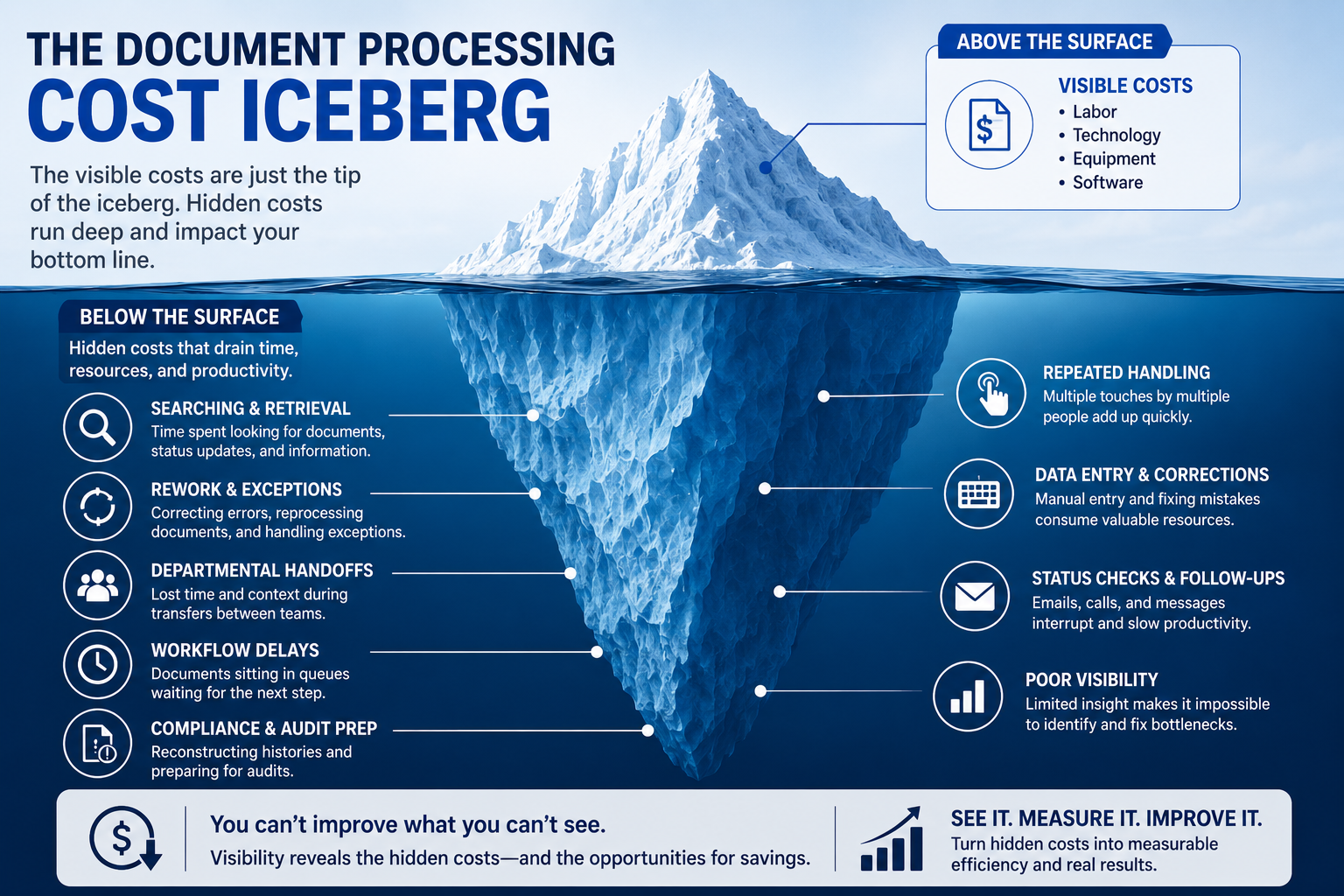
Why Is Document Processing So Expensive?
A document’s journey may look simple from the outside.
It arrives. Someone processes it. The information reaches the right person. The document is eventually stored.
In reality, the journey may contain dozens of individual actions.
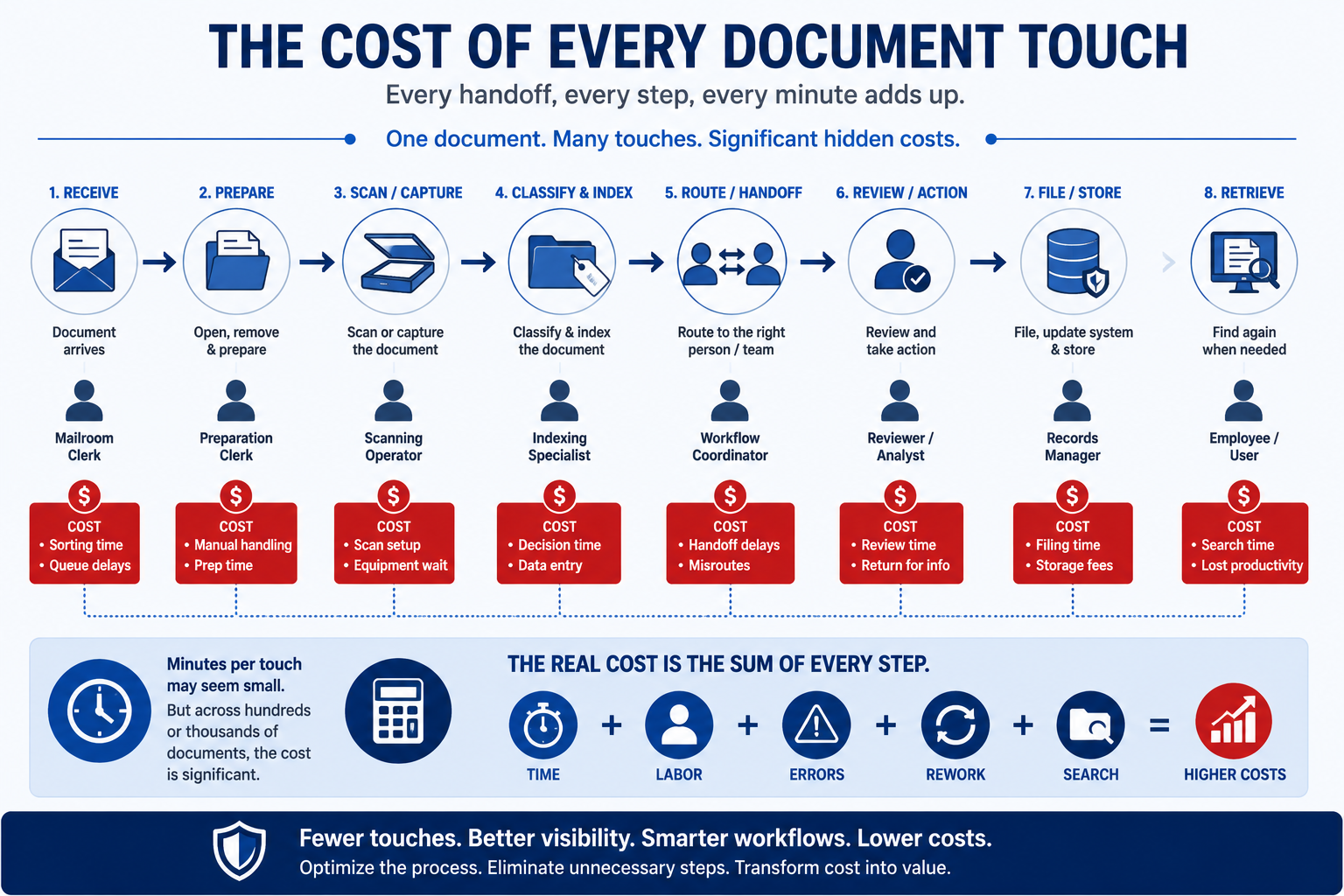
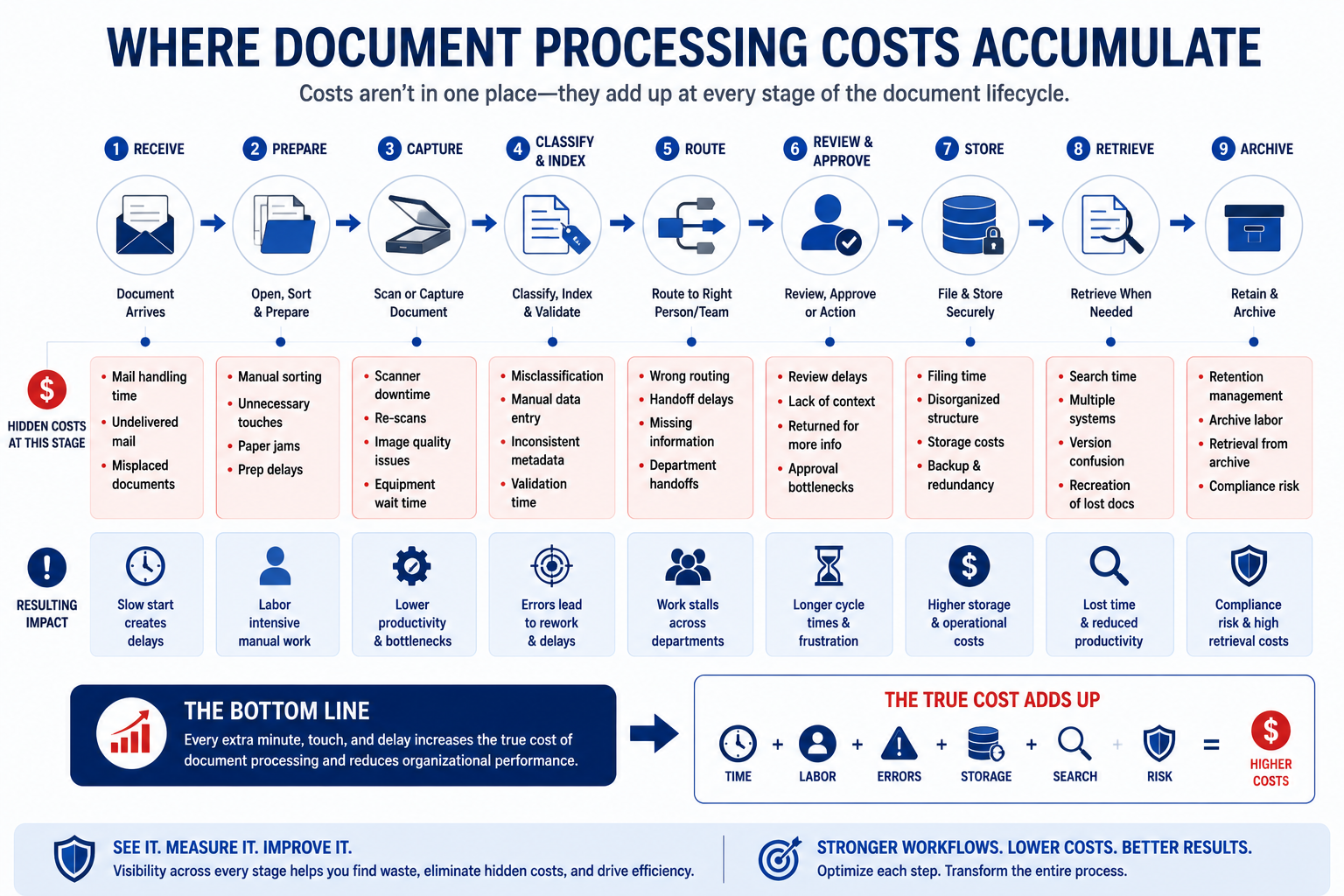
A physical document may need to be received, opened, prepared, sorted, scanned, classified, indexed, reviewed, routed, approved, retrieved, and archived.
Digital documents can create their own complications. Email attachments, shared folders, departmental applications, and disconnected systems may require employees to manually move information from one place to another.
The real cost of document processing is therefore not simply the cost of scanning a page.
It is the combined cost of every activity required to move information from arrival to useful action.
As we explored in From Paper to Data: How Modern Mailrooms Turn Physical Mail into Digital Intelligence, capturing a document digitally is an important step. However, digitization alone does not automatically remove inefficient processes.
To understand the true cost, organizations need to look deeper into the workflow.
1. Manual Document Preparation and Handling
Before information can be processed, somebody often has to prepare it.
Physical mail may need to be:
- Received
- Opened
- Removed from envelopes
- Separated
- Sorted
- Oriented
- Grouped
- Prepared for scanning
Each action takes time.
Individually, these tasks may appear minor. At higher document volumes, however, repetitive preparation can consume a substantial portion of an employee’s day.
The problem becomes more noticeable when highly trained employees spend significant time completing repetitive handling tasks instead of higher-value work.
Manual preparation can also create inconsistencies.
One employee may prepare a document differently from another. Documents may enter the next processing stage in different conditions or formats, increasing the likelihood that additional intervention will be required later.
The cost does not stop at preparation.
It follows the document downstream.
2. The Cost of Repeated Document Touches
How many people touch a document before its information reaches the person who needs it?
For many organizations, the answer is difficult to determine.
A document may be handled by a mailroom employee, a scanning operator, an indexing specialist, a department administrator, and a workflow owner.
Some of those touches are necessary.
Others exist because the workflow itself requires people to compensate for missing information, disconnected systems, or unclear routing.
Every unnecessary document touch introduces another opportunity for:
- Delay
- Misrouting
- Duplicate work
- Human error
- Lost context
Repeated handling also makes document processing costs harder to measure.
The cost of one employee spending two minutes on a document may appear insignificant. When five employees each spend two minutes handling the same document, the workflow has consumed ten minutes before the document’s actual business purpose may even begin.
A useful question for organizations is simple:
How many times does the average document need to be touched before useful action occurs?
If the answer is unknown, there may already be an important visibility problem.
3. Searching for Documents Is Work Too
Searching does not produce a finished document.
It does not complete an approval.
It does not serve a customer.
Yet employees may spend valuable time trying to answer questions such as:
- Where is the document?
- Was it scanned?
- Who received it?
- Has it been reviewed?
- Which folder contains the latest version?
- Has another department already processed it?
The search may begin in a shared drive.
Then email.
Then a document management system.
Then a phone call.
Then a message to another department.
This is one reason real-time document visibility is so closely connected to document processing costs.
When employees cannot quickly see the status of information, they have to recreate that visibility manually.
They ask questions.
They search systems.
They send follow-up messages.
They interrupt other employees.
As discussed in Why Real-Time Document Visibility Matters in Modern Operations, organizations cannot effectively manage workflows they cannot see.
Poor visibility creates work.
That work has a cost.
4. Manual Data Entry and Error Correction
Documents frequently contain information that must enter another business system.
Names.
Account numbers.
Dates.
Reference numbers.
Amounts.
Transaction information.
Customer details.
When employees manually transfer this information, the organization is paying for both the initial data entry and any correction required when something goes wrong.
An error may trigger:
- Additional review
- A rejected transaction
- Customer contact
- Document retrieval
- Data correction
- Supervisor involvement
- Reprocessing
The original mistake may take seconds.
Correcting the downstream consequences can take considerably longer.
This is one of the reasons document capture, data collection, and workflow technologies are so important in document-heavy environments.
Agissar’s INFOPoll® and INFOPointe™ technologies are designed around data collection and process visibility. When information can be captured and connected to the workflow as processing occurs, organizations gain a clearer view of what is happening throughout the operation.
The goal is not simply to make people work faster.
It is to reduce the unnecessary work created when information must repeatedly be entered, checked, located, or reconstructed.
5. Workflow Waiting Time Has a Cost
A document does not have to be actively processed to create expense.
Sometimes the cost comes from waiting.
Documents may sit:
- In an incoming mail queue
- At a scanning station
- In an indexing queue
- Awaiting review
- Waiting for approval
- Between departments
- In an exception queue
Nothing appears to be happening.
That is precisely the problem.
Waiting time can extend processing cycles and create secondary work.
Employees begin following up.
Customers ask for updates.
Managers investigate delays.
Departments escalate requests.
The document itself has not changed, but the amount of organizational activity surrounding it has increased.
This is where workflow bottlenecks become expensive.
A bottleneck in one processing stage can affect every stage that follows.
The longer a delay remains invisible, the more opportunity it has to create additional work.
6. Rework and Exception Handling Quietly Consume Resources
Most document workflows have exceptions.
A document may be incomplete.
A scan may need to be reviewed.
Information may not match an expected format.
A document may reach the wrong department.
Exceptions are not necessarily evidence of a failed workflow. Complex business processes will always require some level of human judgment.
The cost problem appears when organizations cannot clearly identify, track, and manage those exceptions.
An employee may need to:
- Discover the problem.
- Determine what happened.
- Find the original document.
- Identify the correct workflow owner.
- Correct the information.
- Re-enter or reroute the document.
- Confirm that processing has resumed.
That is a great deal of activity created by a single exception.
Without clear document histories and workflow visibility, employees may also repeat investigative work already performed by someone else.
Rework is particularly dangerous from a cost perspective because it can look like normal productivity.
People are busy.
Documents are moving.
Emails are being sent.
Problems are being solved.
But the organization is paying employees to perform work that would not have been necessary if the document had moved correctly through the process the first time.
7. Departmental Handoffs Create Hidden Workflow Costs
Many document workflows cross departmental boundaries.
A document may move from the mailroom to scanning, from scanning to data entry, from data entry to operations, and from operations to records management.
Every handoff creates a transition point.
Transitions are where context can disappear.
One department may use a different naming system.
Another may rely on email.
A third may track work in a spreadsheet.
Another may use a specialized application.
Employees then become the connection between disconnected processes.
They download files.
Rename documents.
Send attachments.
Update spreadsheets.
Enter status information.
Ask whether work has been completed.
These activities are sometimes described as administrative tasks.
From a workflow perspective, they may actually be signs of process fragmentation.
The hidden costs of unstructured documents often become especially visible at these handoff points because information lacks the consistent structure and context needed to move smoothly between systems and teams.
The more fragmented the process, the more human effort may be required to keep information moving.
8. Compliance and Audit Preparation Can Reveal Process Inefficiencies
An audit has a way of exposing weaknesses that everyday operations learn to work around.
Suddenly, an organization may need to answer very specific questions.
When was a document received?
Who handled it?
Where did it move next?
Was a required action completed?
When was the record archived?
Can the organization demonstrate the complete history?
If those answers are not readily available, employees may have to reconstruct them.
Emails are searched.
Logs are reviewed.
Files are retrieved.
Employees are interviewed.
Different systems are compared.
The cost is not limited to the audit itself.
The deeper problem is that the organization has been operating without a readily accessible history of its own document workflow.
As discussed in Audit-Ready by Design: How to Build a Fully Traceable Document Workflow, traceability should be part of the process rather than something an organization attempts to recreate after the fact.
A visible, traceable workflow can support both everyday operations and audit preparation.
When document history is captured as work occurs, employees do not have to spend as much time reconstructing the past.
9. Poor Visibility May Be the Most Expensive Cost of All
There is one document processing expense that influences nearly every other cost discussed in this article.
Not knowing.
Not knowing where documents are.
Not knowing which stage is slowing down.
Not knowing how many exceptions are waiting.
Not knowing how often documents are reworked.
Not knowing where employees spend the most processing time.
Not knowing which handoff creates repeated delays.
When an organization lacks workflow visibility, managers may see the symptoms without seeing the cause.
Processing costs increase.
Employees appear overloaded.
Customers wait longer.
Backlogs develop.
The immediate reaction may be to add staff or purchase additional equipment.
Sometimes those investments are necessary.
But if the underlying problem is a workflow bottleneck, adding more resources may simply make an inefficient process larger.
Agissar’s INFOPoll® WebWarehouse® is designed to provide status information about documents and components in a process, including where they are located, when they were last handled, and by whom.
That type of visibility changes the cost conversation.
Instead of asking, “Why are our document processing costs increasing?”
Organizations can begin asking more precise questions.
Where is time being consumed?
Which stage creates the most exceptions?
Where does work stop moving?
Which documents require repeated handling?
What process should we improve first?
Better questions lead to better operational decisions.
How Do Small Workflow Delays Become Large Expenses?
The most important thing to understand about hidden document processing costs is that they are rarely isolated.
One delay can create another activity.
A document waits in a queue.
Someone follows up.
An employee searches for the document.
Another employee stops working to answer the question.
The document is discovered in the wrong workflow.
It is rerouted.
A deadline is now approaching.
The issue is escalated.
A manager becomes involved.
What began as a small processing delay has now consumed time from several people.
This is the cost snowball effect.
The original inefficiency creates secondary work. Secondary work creates interruptions. Interruptions slow other processes.
The expense spreads beyond the document that created the problem.
How Can Organizations Identify Hidden Document Processing Costs?
The first step is not necessarily buying new technology.
The first step is understanding the current process.
Follow a document.
Start at the moment information enters the organization and trace its journey until the business process is complete.
Ask:
- How many people touch the document?
- How many systems are involved?
- Where is information entered manually?
- Where does the document wait?
- How are exceptions identified?
- How often is work returned for correction?
- How do employees find document status?
- What happens when a document cannot be located?
- Can the complete processing history be reviewed?
Organizations should pay particular attention to activities employees describe with phrases such as:
“We always have to…”
“Someone usually checks…”
“I keep a spreadsheet for…”
“I email the department to find out…”
“We scan it again if…”
“Only one person knows how to…”
Those statements can reveal invisible work.
Invisible work is often where hidden costs live.
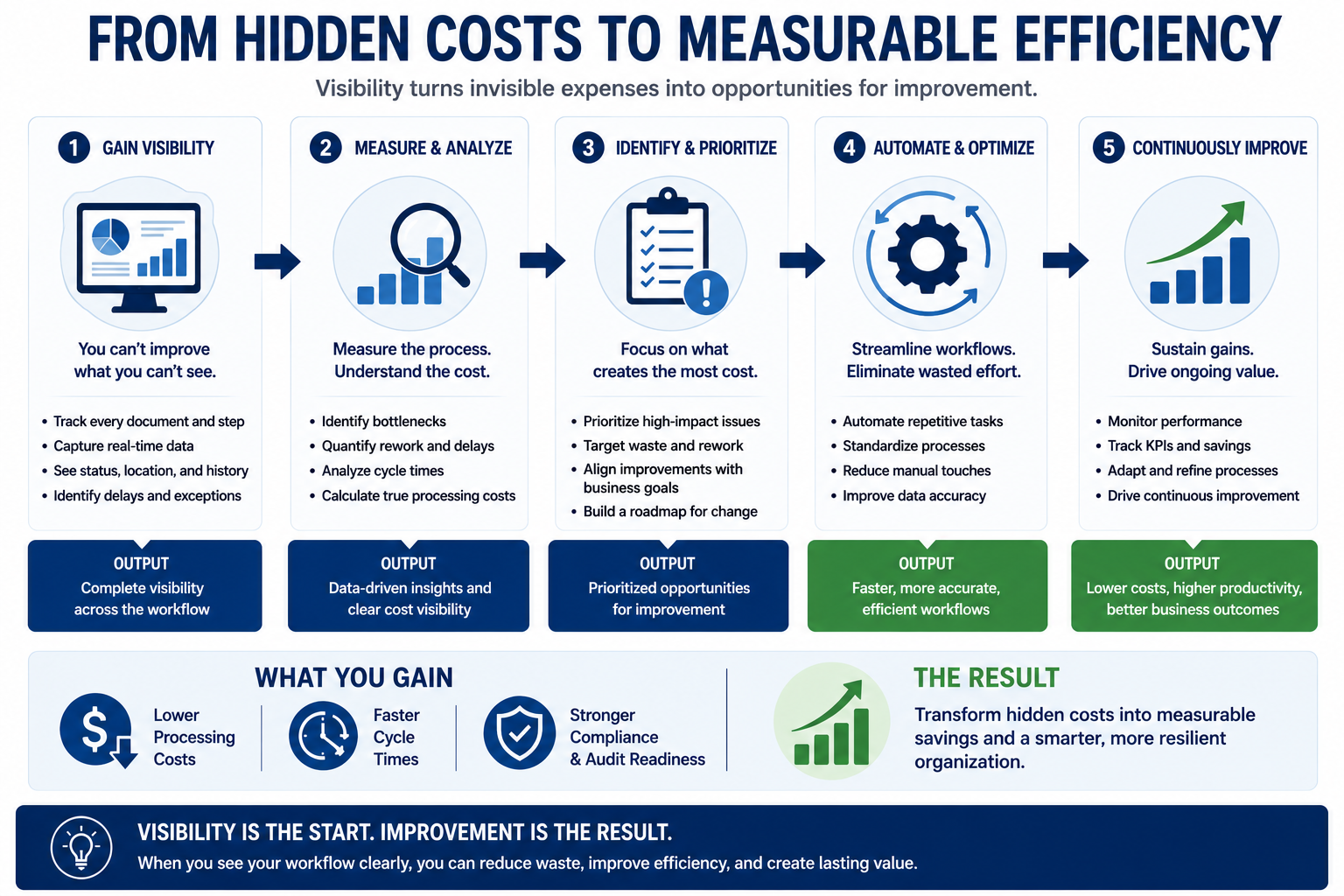
Reducing Document Processing Costs Starts With Visibility
Cost reduction does not always mean doing the same work faster.
Sometimes it means removing work that should not exist.
A more efficient document workflow may reduce:
- Repeated document touches
- Manual status checks
- Duplicate data entry
- Unnecessary handoffs
- Rework
- Search time
- Delayed exception discovery
This is why visibility should come before optimization.
Organizations need to understand how documents actually move before deciding where automation will create the greatest value.
Real-time data capture can help show what is happening.
Document tracking can reveal where work slows.
Workflow histories can expose repeated exceptions.
Centralized information can reduce status searches.
Once the process becomes visible, organizations can make more informed decisions about automation.
Where Agissar Fits Into the Cost Conversation
Agissar’s approach extends beyond moving paper faster.
INFOPoll®, INFOPointe™, and WebWarehouse® support data collection, process tracking, and document or component visibility across operational workflows.
INFOPointe™ can provide real-time data capture from compatible automated mailroom, print, and scanning equipment while interfacing with the INFOPoll® Enterprise Edition platform.
WebWarehouse® adds closed-loop process visibility by helping organizations identify the status of documents or components, where they are located, when they were last handled, and by whom.
For document-intensive operations, that information can help reveal where time and effort are being consumed.
The objective is not automation for automation’s sake.
It is creating a workflow that can be understood, measured, and improved.
Looking Ahead: What Makes a Document Workflow AI-Ready?
Once an organization can see its document workflow, another question becomes possible.
Is the information structured well enough for more intelligent forms of automation?
Artificial intelligence cannot repair every broken process simply by being added to existing software.
AI-ready document workflows depend on reliable capture, consistent metadata, accessible information, and clearly understood processes.
A fragmented workflow does not automatically become intelligent because an AI tool is introduced.
The foundation matters.
In our next article, we will explore What Makes a Document Workflow AI-Ready? and examine the practical building blocks organizations need before intelligent automation can deliver meaningful results.
Frequently Asked Questions
What are document processing costs?
Document processing costs include the labor, technology, handling, data entry, searching, correction, routing, storage, and administrative work required to move documents and information through an organization.
Why is manual document processing expensive?
Manual document processing can become expensive because documents often require repeated handling, data entry, status checks, departmental handoffs, and error correction. Small amounts of manual work can accumulate across high document volumes.
What are hidden document processing costs?
Hidden document processing costs are expenses that may not appear as separate budget items. Examples include employee search time, rework, workflow delays, repeated document touches, exception handling, and audit preparation.
How does poor document visibility increase costs?
Poor visibility forces employees to manually search for information, request status updates, investigate delays, and reconstruct document histories. These activities consume time without directly advancing the document’s business purpose.
How can organizations reduce document processing costs?
Organizations can begin by mapping document workflows, measuring repeated handling, identifying bottlenecks, improving document visibility, and automating activities that create unnecessary manual work.
Does document automation automatically reduce costs?
Not necessarily. Automation creates the greatest value when organizations understand their existing processes and apply technology to measurable workflow problems. Automating an inefficient process without understanding it can preserve unnecessary complexity.
How does a digital mailroom help control document processing costs?
A digital mailroom can improve document capture, classification, indexing, routing, and visibility. By moving incoming information into structured workflows earlier, organizations may reduce manual handling and improve access to document status.
Key Takeaways
- Document processing costs extend far beyond scanners, software, and direct labor.
- Repeated document touches can quietly increase processing time.
- Searching for document status is work and should be considered part of workflow cost.
- Manual data entry errors can create expensive downstream rework.
- Waiting time and bottlenecks often generate secondary administrative activity.
- Departmental handoffs can expose fragmented processes and disconnected systems.
- Audit preparation becomes more difficult when document histories must be reconstructed.
- Poor visibility makes it harder to identify where costs actually originate.
- Organizations should understand and measure workflows before deciding what to automate.
- Real-time data capture and document visibility create a stronger foundation for continuous improvement and AI-ready operations.
Conclusion
The true cost of document processing is rarely found in one place.
It accumulates.
A few minutes spent preparing documents.
Another few minutes searching for status.
A correction.
A follow-up email.
A delayed approval.
An exception that requires investigation.
A document that crosses several disconnected systems.
Each activity may seem insignificant on its own.
Together, they can create an expensive workflow that an organization has gradually learned to accept as normal.
Reducing document processing costs begins by making those activities visible.
When organizations understand where documents go, how often they are handled, where they wait, and why exceptions occur, hidden costs become measurable operational problems.
And measurable problems can be improved.
That is the real opportunity behind modern document automation: not simply processing more documents, but creating workflows that are easier to see, understand, and continuously improve.
Table of Contents
Share This!
Related Posts






Agissar not only has a history of game-changing advances in the mail extraction industry, we also have a stellar reputation for excellent products, services and attention to detail that has been built over decades. It shows in our relationships with suppliers, clients, and our ability to get excellent value for your dollar while supporting a wide range of mailing, imaging, and office products from the simple to the complex. We can custom tailor service programs to meet your needs and help you get to the top of your industry, all you need to do is contact us today!